How to add tenants and the correct association with users in the new Docker Compose 8.8? Are there any properties to put in .identity/application.yaml?
Great question about tenant configuration in Camunda 8.8! Let me break down how to add tenants and associate them with users in Docker Compose.
Classification: General Question
Tenant Configuration in Camunda 8.8 Docker Compose
1. Enable Multi-Tenancy
First, you need to enable multi-tenancy by setting this environment variable in your .env file or Docker Compose:
MULTI_TENANCY_ENABLED=true
Important: Multi-tenancy requires Identity to be configured with a database.
2. Configure Tenants via Environment Variables
The recommended approach for Docker Compose is to use environment variables to predefine tenants and their user associations. Here’s an example configuration:
IDENTITY_TENANTS_0_NAME=Tenant Showcase
IDENTITY_TENANTS_0_TENANT_ID=showcase
IDENTITY_TENANTS_0_MEMBERS_0_TYPE=USER
IDENTITY_TENANTS_0_MEMBERS_0_USERNAME=demo
IDENTITY_TENANTS_0_MEMBERS_1_TYPE=APPLICATION
IDENTITY_TENANTS_0_MEMBERS_1_APPLICATION_ID=modeler-showcase

IDENTITY_TENANTS_1_NAME=Default
IDENTITY_TENANTS_1_TENANT_ID=<default>
IDENTITY_TENANTS_1_MEMBERS_0_TYPE=USER
IDENTITY_TENANTS_1_MEMBERS_0_USERNAME=demo
This configuration creates tenants and associates users/applications with them at startup.
3. Regarding .identity/application.yaml
Based on the available documentation, there are no specific properties for tenant-user association in the application.yaml file. The tenant configuration is primarily handled through:
- Environment variables (as shown above) - for initial setup
- Identity UI - for ongoing management after startup
4. Managing Tenants After Startup
Once your Docker Compose setup is running, you can:
- Log into the Identity UI
- Navigate to the Tenants tab
- Create new tenants and assign users interactively
Summary
- Use
MULTI_TENANCY_ENABLED=trueto enable multi-tenancy - Configure initial tenants via environment variables in Docker Compose
- Use the Identity UI for ongoing tenant and user management
- The
application.yamlapproach is not documented for tenant configuration
References:
Let me know if you need help with any specific aspect of the tenant configuration!
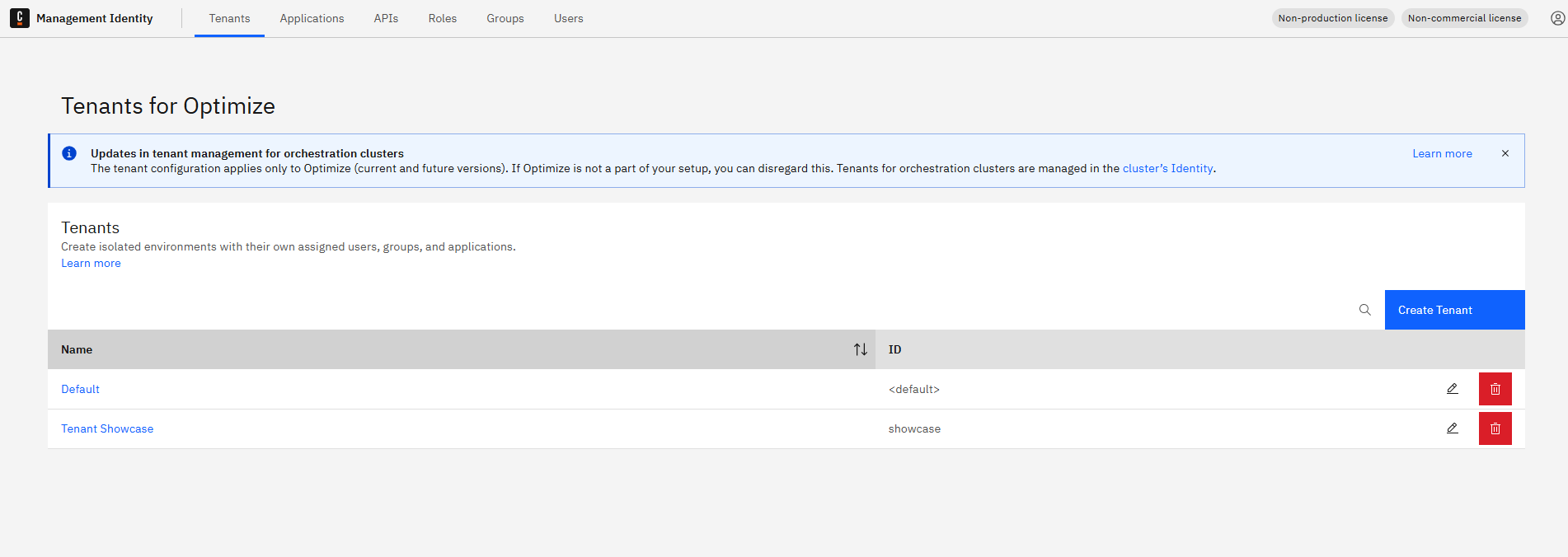
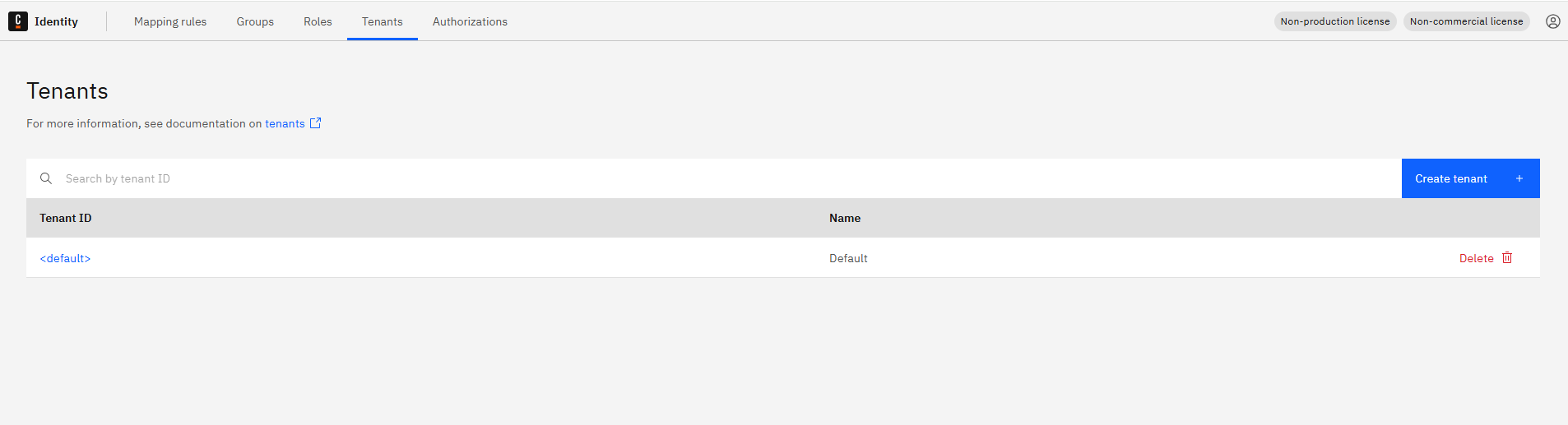
Thanks for the additional context and screenshots, @Cristiano_Carretti! This clarifies the issue perfectly.
The Problem: Identity Architecture Change in 8.8
What you’re experiencing is expected behavior due to a major architectural change in Camunda 8.8. Here’s what’s happening:
8.7 vs 8.8 Identity Architecture
Camunda 8.7 (Old Identity):
- Single Keycloak-based Identity service on port 8084
- Tenant configuration via environment variables (
IDENTITY_TENANTS_*) - All components used the same Identity system
Camunda 8.8 (New Identity):
- Split Identity architecture with two separate systems:
- Orchestration Cluster Identity (port 8088) - for runtime components (Zeebe, Operate, Tasklist)
- Management Identity (port 8084) - for platform components (Web Modeler, Optimize)
Why Your Configuration Isn’t Working
Your environment variables from 8.7 are still creating tenants in the old Management Identity (port 8084), but the new Orchestration Cluster Identity (port 8088) doesn’t recognize these environment variables.
The IDENTITY_TENANTS_* environment variables you used in 8.7 are not supported by the new Orchestration Cluster Identity in 8.8.
Migration Solution
Unfortunately, there’s no direct environment variable migration path for tenant configuration from 8.7 to 8.8. You have two options:
Option 1: Manual Recreation (Recommended)
- Access the new Identity UI at
http://localhost:8088/identity/tenants - Manually recreate your tenants and user associations
- This ensures proper integration with the new architecture
Option 2: Wait for Documentation
The new Orchestration Cluster Identity configuration methods are not yet fully documented, as this is a new feature in 8.8.
Key Takeaways
- Your 8.7 configuration is working correctly for the old system (port 8084)
- The new runtime components use the new Identity system (port 8088)
- Environment variable-based tenant configuration has been replaced with UI-based management
- This is a breaking change that requires manual migration
Next Steps
- Use the new Identity UI at port 8088 to recreate your tenants
- Verify that runtime components (Operate, Tasklist) can see the new tenants
- Keep the old Identity (port 8084) if you’re using Web Modeler or Optimize
References:
This is a significant architectural improvement that simplifies Identity management for runtime components, but it does require this one-time migration step. Let me know if you need help with the manual recreation process!