The Camunda SOAP connector doesn’t use a custom class. It is part of the main distribution of Camunda (one of two “connectors” provided by Camunda). If you give it the proper “url”, “payload”, and “headers”, it will do the rest. For me, this wasn’t the complicated part. Parsing the response sent by the SOAP service was complicated by the fact that I was trying to use SPIN in a version of Camunda that had a SPIN bug in it. I gave up on SPIN and we utilized a custom class to parse the SOAP XML.
This bug has been fixed and many of our developers are using SPIN now and I would recommend that you do this. That said, Camunda, like any software, has its strengths and weaknesses. For example, ActiveVos from Informatica (which I have also used) makes interacting with SOAP service much easier than Camunda. However, ActiveVos is very expensive and doesn’t scale like Camunda.
Another issue with Camunda is the transition to a standalone “Modeler” application. This standalone application doesn’t have nearly the functionality that Eclipse with the Camunda plugin has. It is, however, much easier to use for process design than Eclipse, which is probably why Camunda has chosen develop it further and stop development of the Eclipse plugin.
As far as the BPMN code is concerned, and this is just my opinion, you should avoid writing BPMN code directly whenever possible. Nearly every feature within Camunda is accessible through the Modeler interface. The advantage of staying in the Modeler application versus hand coding BPMN is, the Modeler will produce syntactically correct code nearly every time. So, you have to be very careful if you choose to directly modify the BPMN code itself. The code that I gave you is pretty much everything you need to make the SOAP call.
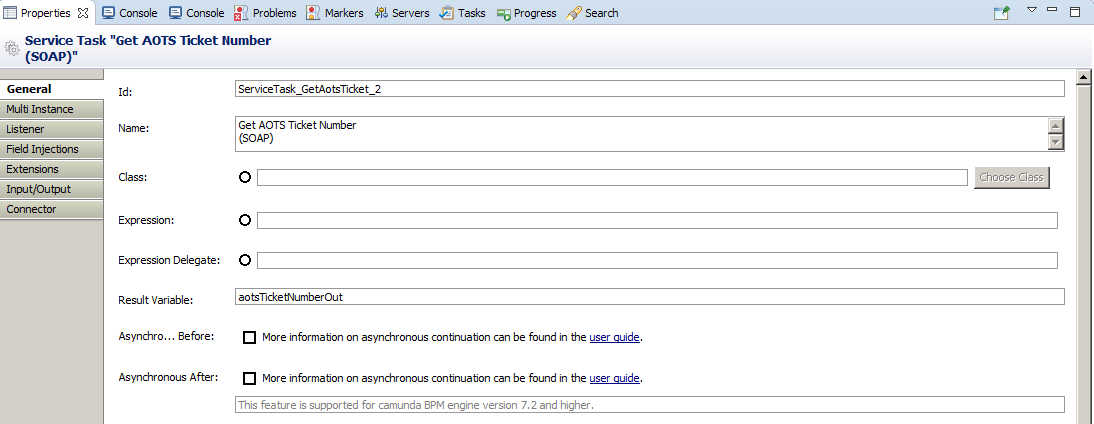
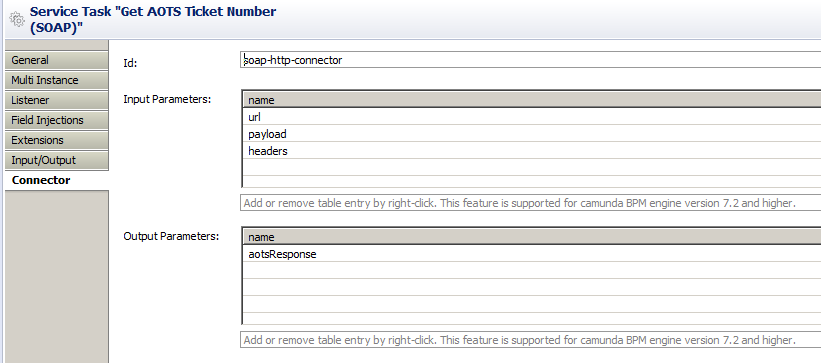
The following are from Eclipse and show the two main property pages that are used to make the SOAP call. The BPMN code for them is what I put in my previous post. The code I used to parse the response I cannot share, not because it’s it contains some sort of “magic”, but because I would have to clear it through our legal department first. Suffice it to say that’s it’s nothing more than a library that allows you to provide a key that returns a value from XML. In any event, you should be using SPIN for this.
In the property pages below, the key variables are in the SOAP connector input and output sections. Basically, “url”, “payload”, and “headers”, provide information to make the SOAP call itself. “aotsResponse” is the raw XML response from the SOAP web service. In this case, you would pass “aotsResponse” through SPIN to extract whatever values you wanted from the response. Remember, your SOAP request will be encoded in an FTL file that you reference in the SOAP connector configuration “payload” variable. That FTL file will look almost identical to the actual SOAP message sent, with the exception that any values within that need to modified by your process will be represented by process variables and in the form of “${variable}”.
Service Task Configuration:
[cid:image002.png@01D2291E.13B5E090]
Camunda HTTP SOAP Connector Configuration:
[cid:image001.png@01D2291E.72418560]
For example, if the SOAP service requires you to provide a user name for authentication and that user name might vary based upon how the process was started, your FTL file would contain something like this:
ns1:username
${soapUserName}
</ns1:username>
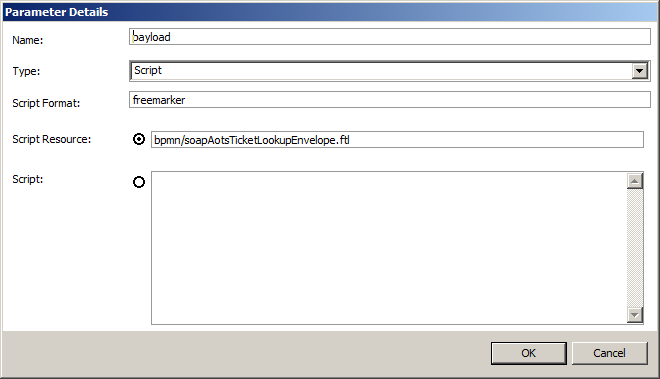
I can’t really tell you how your SOAP message will look. You need to use something like SoapUI (SmartBear Software provides a free version) to build the SOAP message itself. Once you have that, you put the message into the FTL file. Here is the parameter panel for the “payload” variable. In it you can see I have referenced an FTL file called bpmn/soapAotsTicketLookupEnvelope.ftl. The SOAP request that you build in SoapUI would be put into the FTL file and then you substitute any static values with FTL variables whose value is represented by a process variable of the same name (e.g. ${soapUserName} would have the value of process variable “soapUserName”). The value of the process variable must be set elsewhere in your process.
[cid:image004.png@01D22920.6EAC3EC0]
Michael Peoples (mp4783)
Global Customer Service BizOps Orchestration
Office: +1 614-886-0923
Mobile: +1 614-886-0923
Principal Applications Developer