Hello team,
We are currently applying Camunda to implement a conditional UI Flow for end-users.
Specifically, as illustrated in the diagram belows:
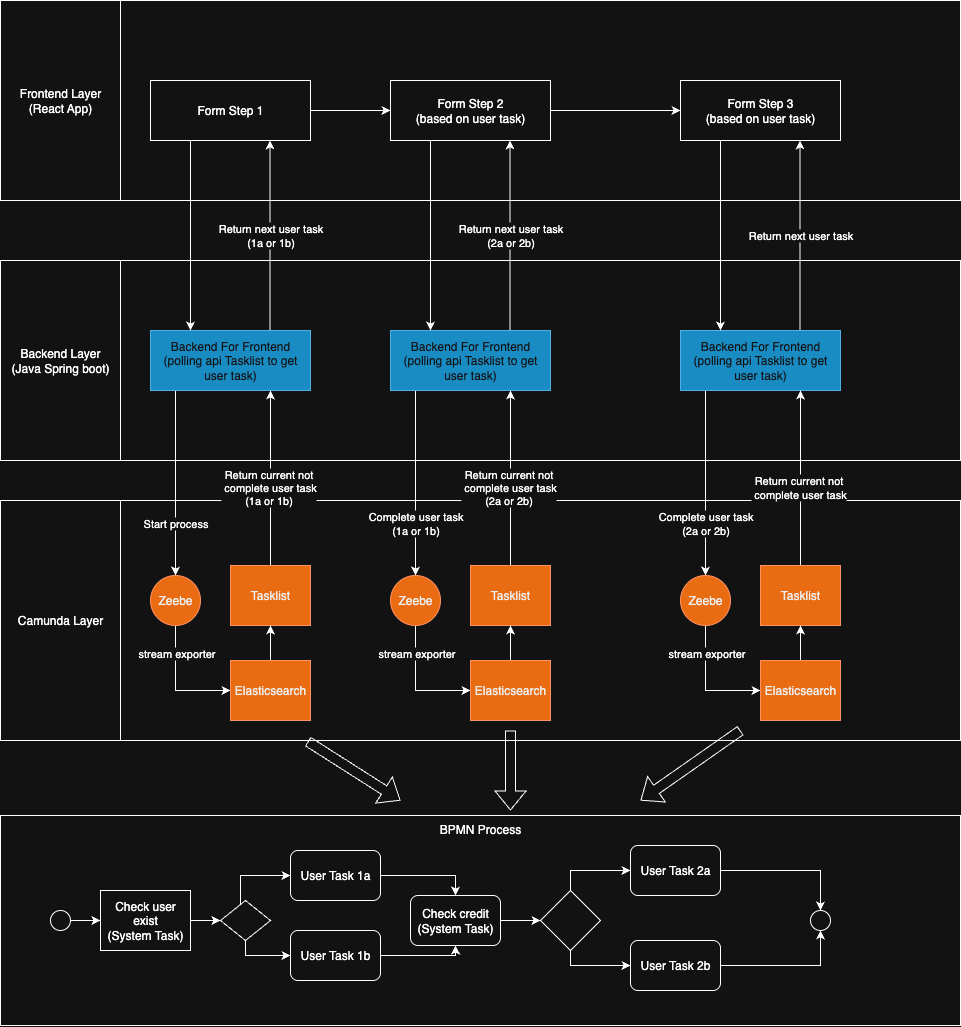
We have a React application that handles the UI, where users go through a series of steps. The visibility of each subsequent step depends on the input provided in the previous step.
Our current approach is as follows:
Each time the user clicks “Next” on the interface:
- The Backend For Frontend (BFF) temporarily saves the user’s requests to the database & do some validation check
- Next, it interacts with Camunda to start or continue the process until it pauses at a User Task.
- At this point, the backend calls the Tasklist API to retrieve the current User Task information (we use the screen name as the User Task name) and returns this to the React app. The mechanism here is interval repeat call Tasklist API until its return data then BFF send user task information back to react app
- The React app receives the screen name and renders the corresponding UI
At the moment, this mechanism is worked but it has one major issue: Performance
We conduct a performance test by simulate 500 users to do this form repeatedly (using JMeter & API Calls) over 15 minutes
We observed that to switch between steps form, it tooks 5-6 seconds on average at the first 100 users → when it goes to 500 users, its 10s which is really bad for user experience
Check the response time, we don’t see any bottlenecks in backend or database, but realize that
to get next user task during the process execution, the BFF normally need to call API Tasklist 6-10 times (each time was quite fast, around <400ms, but aggregately, it’s a huge amount of execution times)
We want to achieve <1s switching between step form.
So our goal when optimization is try to reduce the numbers of API call from BFF to Tasklist, but the Tasklist need to have data in elastichsearch in order to return data for BFF which depends on zeebe’s stream exporter (if my assumption is right)
So my question would be:
- Is there any docs that have guideline for optimize zeebe & elastich integration, especially to decrease export time
- Or there is another way for BFF to call Zebee directly to get user tasks instead of tasklist/operate
Other informations:
- We check the execution time of job worker handle system task → it’s < 1s on average, so this maybe not a starting point for us
- Hardware requirement: we follow the recommendation from official document for self-managed