Hello,
I’d like to ask about user assignment in Camunda Tasklist (self-managed).
Is there a way to assign a task to multiple users at the same time?
I know that the standard assign API sets a single assignee, so to work around this, we considered using the update API and populating the candidateUsers list instead — treating those users as assignees in our own code logic.
However, we noticed that the update API replaces the entire candidateUsers list rather than appending to it. This means we would need to:
- Call
GET /task/{id} to retrieve the existing candidateUsers
- Append the new user to the list
- Then call
PATCH /task/{id} with the updated list
This approach requires two API calls just to add a single user.
Is there a cleaner or more efficient way to handle this scenario? Maybe an API that allows adding to candidateUsers without overwriting?
Thanks in advance!
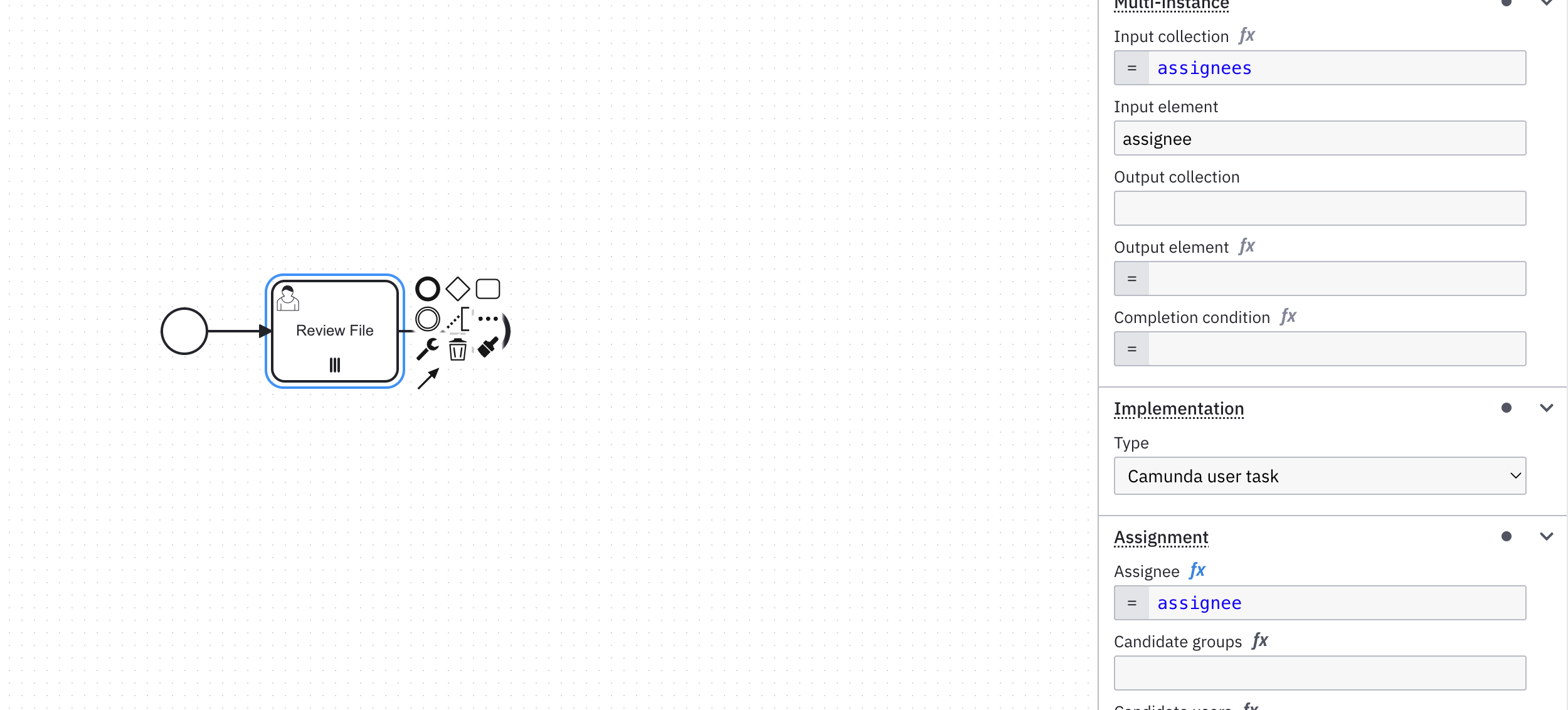
Hi @tlmouden, you can use a multi-instance user task for true parallel assignments:
Example:
- BPMN task marked as parallel multi-instance
- Collection = list of users
- Each user gets their own instance of the task
- All (or some) must complete their task
loopCharacteristics:
  collection: assignees
  elementVariable: assignee
  multiInstance: parallel
Note: Then use FEEL or input mappings to assign.
 Each user gets a separate task instance.
Can be tracked and completed independently.
Here’s a sample bpmn xml for multi-instance user task:
<?xml version="1.0" encoding="UTF-8"?>
<bpmn:definitions xmlns:bpmn="http://www.omg.org/spec/BPMN/20100524/MODEL" xmlns:bpmndi="http://www.omg.org/spec/BPMN/20100524/DI" xmlns:dc="http://www.omg.org/spec/DD/20100524/DC" xmlns:zeebe="http://camunda.org/schema/zeebe/1.0" xmlns:di="http://www.omg.org/spec/DD/20100524/DI" xmlns:modeler="http://camunda.org/schema/modeler/1.0" id="Definitions_0tqy62d" targetNamespace="http://bpmn.io/schema/bpmn" exporter="Camunda Modeler" exporterVersion="5.32.0" modeler:executionPlatform="Camunda Cloud" modeler:executionPlatformVersion="8.6.0">
  <bpmn:process id="Process_1eutxbs" isExecutable="true">
    <bpmn:startEvent id="StartEvent_1">
      <bpmn:outgoing>Flow_08fqum9</bpmn:outgoing>
    </bpmn:startEvent>
    <bpmn:sequenceFlow id="Flow_08fqum9" sourceRef="StartEvent_1" targetRef="Activity_09rcmjn" />
    <bpmn:endEvent id="Event_0mpfrns">
      <bpmn:incoming>Flow_1vita5m</bpmn:incoming>
    </bpmn:endEvent>
    <bpmn:sequenceFlow id="Flow_1vita5m" sourceRef="Activity_09rcmjn" targetRef="Event_0mpfrns" />
    <bpmn:userTask id="Activity_09rcmjn" name="Review File">
      <bpmn:extensionElements>
        <zeebe:userTask />
        <zeebe:assignmentDefinition assignee="=assignee" />
      </bpmn:extensionElements>
      <bpmn:incoming>Flow_08fqum9</bpmn:incoming>
      <bpmn:outgoing>Flow_1vita5m</bpmn:outgoing>
      <bpmn:multiInstanceLoopCharacteristics>
        <bpmn:extensionElements>
          <zeebe:loopCharacteristics inputCollection="=assignees" inputElement="assignee" />
        </bpmn:extensionElements>
      </bpmn:multiInstanceLoopCharacteristics>
    </bpmn:userTask>
  </bpmn:process>
  <bpmndi:BPMNDiagram id="BPMNDiagram_1">
    <bpmndi:BPMNPlane id="BPMNPlane_1" bpmnElement="Process_1eutxbs">
      <bpmndi:BPMNShape id="StartEvent_1_di" bpmnElement="StartEvent_1">
        <dc:Bounds x="152" y="102" width="36" height="36" />
      </bpmndi:BPMNShape>
      <bpmndi:BPMNShape id="Event_0mpfrns_di" bpmnElement="Event_0mpfrns">
        <dc:Bounds x="392" y="102" width="36" height="36" />
      </bpmndi:BPMNShape>
      <bpmndi:BPMNShape id="Activity_0ndku1v_di" bpmnElement="Activity_09rcmjn">
        <dc:Bounds x="240" y="80" width="100" height="80" />
        <bpmndi:BPMNLabel />
      </bpmndi:BPMNShape>
      <bpmndi:BPMNEdge id="Flow_08fqum9_di" bpmnElement="Flow_08fqum9">
        <di:waypoint x="188" y="120" />
        <di:waypoint x="240" y="120" />
      </bpmndi:BPMNEdge>
      <bpmndi:BPMNEdge id="Flow_1vita5m_di" bpmnElement="Flow_1vita5m">
        <di:waypoint x="340" y="120" />
        <di:waypoint x="392" y="120" />
      </bpmndi:BPMNEdge>
    </bpmndi:BPMNPlane>
  </bpmndi:BPMNDiagram>
</bpmn:definitions>
Thank you for your reply. I appreciate it!