Hi,
I’m running into an authentication error within my connectors pod in Kubernetes in a brandnew Camunda 8.8 Helm chart deployment.
2 weeks ago everything was working and now after switching to another Microsoft Entra ID tenant, the connectors pod is throwing new errors which I couldn’t solve until now:
2025-12-08T12:23:10.012Z ERROR 1 --- [   scheduling-1] i.c.c.r.i.i.ProcessDefinitionImporter    : Failed to import process elements

io.camunda.client.api.command.ProblemException: Failed with code 401: 'Unauthorized'. Details: 'class ProblemDetail {
    type: about:blank
    title: Unauthorized
    status: 401
    detail: An Authentication object was not found in the SecurityContext
    instance: /v2/process-definitions/search
}'
I followed the official documentaiton for my values.yaml and configuration items but no matter what I do, this error stays were it is^^
My current auth and security config for orchestration and connectors is as follows:
global:
  multitenancy:
    enabled: false

  security:
    authentication:
      method: "oidc"

  identity:
    auth:
      enabled: true
      issuer: "https://login.microsoftonline.com/${microsoft_tenant_id}/v2.0"
      issuerBackendUrl: "https://login.microsoftonline.com/${microsoft_tenant_id}/v2.0"
      tokenUrl: "https://login.microsoftonline.com/${microsoft_tenant_id}/oauth2/v2.0/token"
      authUrl: https://login.microsoftonline.com/${microsoft_tenant_id}/oauth2/v2.0/authorize
      jwksUrl: "https://login.microsoftonline.com/${microsoft_tenant_id}/discovery/v2.0/keys"
      type: "MICROSOFT"

      publicIssuerUrl: "https://login.microsoftonline.com/${microsoft_tenant_id}/v2.0"

      identity:
        clientId: ${microsoft_client_id_identity}
        audience: ${microsoft_client_id_identity}
        secret:
          existingSecret: ${namespace_name}
          existingSecretKey: "identity-secret"
        redirectUrl: "https://${namespace_name}.${service_uri}${stage_uri}${domain}/identity"
        initialClaimName: preferred_username
        initialClaimValue: ${initial_claim_user}

      optimize:
        clientId: ${microsoft_client_id_optimize}
        audience: ${microsoft_client_id_optimize}
        secret:
          existingSecret: ${namespace_name}
          existingSecretKey: "optimize-secret"
        redirectUrl: "https://${namespace_name}.${service_uri}${stage_uri}${domain}/optimize"

      console:
        clientId: ${microsoft_client_id_console}
        audience: ${microsoft_client_id_console}
        existingSecret:
          name: ${namespace_name}
        redirectUrl: "https://${namespace_name}.${service_uri}${stage_uri}${domain}/console"
        wellKnown: "https://login.microsoftonline.com/${microsoft_tenant_id}/v2.0/.well-known/openid-configuration"

      orchestration:
        clientId: ${microsoft_client_id_orchestration}
        audience: ${microsoft_client_id_orchestration}
        secret:
          existingSecret: ${namespace_name}
          existingSecretKey: "orchestration-secret"
        redirectUrl: "https://${namespace_name}.${service_uri}${stage_uri}${domain}/"

      connectors:
        clientId: ${microsoft_client_id_connectors}
        secret:
          existingSecret: ${namespace_name}
          existingSecretKey: "connectors-secret"
orchestration:
  enabled: true
  contextPath: "/"

  security:
    authentication:
      method: "oidc"
      oidc:
        clientId: ${microsoft_client_id_orchestration}
        secret:
          existingSecret: ${namespace_name}
          existingSecretKey: "orchestration-secret"
        audience: ${microsoft_client_id_orchestration}
        redirectUrl: "https://${namespace_name}.${service_uri}${stage_uri}${domain}/"
        clientIdClaim: azp
        usernameClaim: preferred_username
        groupsClaim: groups
        scope:
          - openid
          - profile
          - offline_access
          - "${microsoft_client_id_orchestration}/.default"
        preferUsernameClaim: true
    initialization:
      defaultRoles:
        admin:
          users:
            - ${initial_claim_user}
        connectors:
          clients:
            - "${microsoft_client_id_orchestration}"
    authorizations:
      enabled: false

  index:
    prefix: "${namespace_name}"

  profiles:
    operate: true
    tasklist: true

  clusterSize: "3"
  partitionCount: "3"
  replicationFactor: "3"

  configuration: |-
    camunda:
      data:
        secondary-storage:
          elasticsearch:
            url: "${elastic_service_protocol}://${elastic_service_url}:${elastic_service_port}"
            username: ${namespace_name}
            password: "${elastic_service_password}"
            security:
              enabled: true
              self-signed: true         # falls du dein eigenes CA verwendest
              verify-hostname: false    # optional, je nach Zertifikat
            index-prefix: "${namespace_name}"

    zeebe:
      broker:
        gateway:
          enable: true
        exporters:
          elasticsearch:
            classname: io.camunda.zeebe.exporter.ElasticsearchExporter
            args:
              url: "https://${elastic_service_url}:${elastic_service_port}"
              index:
                prefix: "${namespace_name}-zeebe"
                createTemplate: true
              authentication:
                username: ${namespace_name}
                password: "${elastic_service_password}"

  env:
    - name: LOGGING_LEVEL_ROOT
      value: warn
    - name: JAVA_TOOL_OPTIONS
      value: >-
        -Djavax.net.ssl.trustStore=/opt/certs/externaldb.jks
        -Djavax.net.ssl.trustStorePassword=${truststore_password}
        -Djavax.net.ssl.trustStoreType=JKS
    - name: CAMUNDA_OPERATE_ELASTICSEARCH_URL
      value: "https://${elastic_service_url}:${elastic_service_port}"
    - name: CAMUNDA_TASKLIST_ELASTICSEARCH_URL
      value: "https://${elastic_service_url}:${elastic_service_port}"

  extraVolumes:
    - name: elastic-ca
      secret:
        secretName: elastic-jks         # enthält ca.crt
        defaultMode: 0444

  extraVolumeMounts:
    - name: elastic-ca
      mountPath: /opt/certs
      readOnly: true
connectors:
  enabled: true
  contextPath: "/connectors"

  configuration: |-
    camunda:
      client:
        mode: self-managed
        grpc-address: "http://camunda02-zeebe-gateway:26500"
        rest-address: "http://camunda02-zeebe-gateway:8080"
        auth:
          method: oidc
          client-id: ${microsoft_client_id_connectors}
          client-secret: "${connector_secret}"
          token-url: "https://login.microsoftonline.com/${microsoft_tenant_id}/oauth2/v2.0/token"
          audience: ${microsoft_client_id_orchestration}
          scope: "${microsoft_client_id_orchestration}/.default"

  security:
    authentication:
      method: "oidc"
      oidc:
        clientId: ${microsoft_client_id_orchestration}
        audience: ${microsoft_client_id_orchestration}
        secret:
          existingSecret: ${namespace_name}
          existingSecretKey: "orchestration-secret"
        tokenScope: "${microsoft_client_id_orchestration}/.default"
I hope someone can help me in this annoying issue.
Thanks and regards
Julian
@Cris_Ron - out of curiosity, why have you set up authentication but also have unprotectedApi: true? Part of me suspects that may causing an issue, because everything is configured to use authentication but then authentication is disabled on the API. If you set that to false do you still get the same error?
@nathan.loding - I tested this value and forgot to remove it from my copy&paste here, so you can ignore it.
@Cris_Ron - other services are working? You can log into Operate, for example? Do API calls work from an external client?
@nathan.loding - I didn’t test the other services as there were no errors in tthe remaining pods and these were all successfull but I just recognized that I get a login mask for operate but my initial User cannot login. I also have a 8.8 platform/console only installation which is configured the same in the global identity config but the login to the /identity site is working over there^^
When I try to open /identity with my initial Entra ID user, I get the error message:
Failmunda - 403 unauthorized
You do not have sufficient permissions to view this page
This was once working 3 weeks ago^^
I tried to send a bpmn modell via desktop Modeler but I get a 404 error with the orchestration address (url/):
Received HTTP status code 404 [ deploy-error ]
I can see that the ingress is there and pointing to the gateway service which points to the Zeebe endpoints.
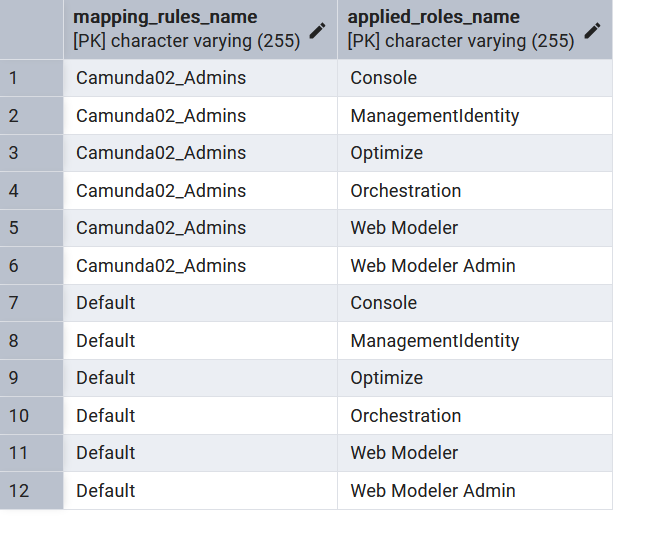
@Cris_Ron - very strange. Did anything change on or around this deployment in that time period? (Infrastructure updates, a new Camunda deployment, EntraID alterations, etc.) Identity stores the role mapping in a database, I would also look to see if that database is up and running, and that Identity can successfully access it. If you are able, you can look at the tables and confirm if the role mappings still exist.
@nathan.loding - Everything is managed with Terraform and I only moved to a new M365 Tenant and didn’t change any configuration item. I checked our PostgresDB regarding the initial_claim_value and then recognized that the user ID is written in it instead of the user mail address. Normally the database is renewed during every new install but I tested with a shortened machanism and after correcting this I can finally login to identity but I still cannot connect/login to Operate or Tasklist. I still get the login prompt and neither the initial user nor any user from my admin group, which I could configure in Identity, can login atm.
Still the Connectors error remains too.
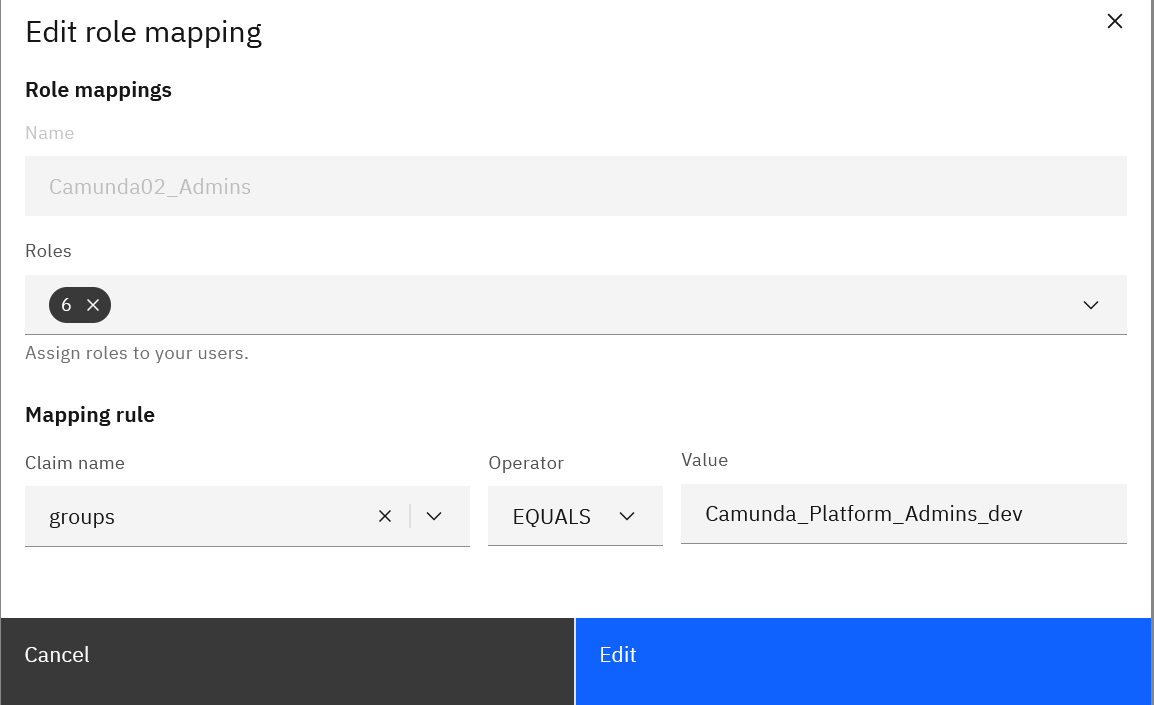
@Cris_Ron - very interesting - and frustrating! Can you share some screenshots or details about how you have those users configured in Identity? Perhaps screenshots of Identity and the mapping tables in Postgres? I’ll share this with our Identity engineers and see what thoughts they have!
@nathan.loding - here are the screenshots from Identity:
When I’m reading through this documentation Link I’m getting the impression, that there configurations missing in my Entra ID, which I never heard of before in the Camunda documentation like configuring all types of scopes and claims (user claims and group claims in the token).
Also the mentioned config for properties like groups-claim differs vastly from other documentation sites.
Here it is written groups-claim or client-id-claim and configured in an application yaml, while here it is written as groupsClaim/clientIDClaim and in the orchestration.security.authentication general path^^
I read more through this documentation path in my first link and realized that the whole helm values.yaml → orchestration.security part isn’t working anymore^^
It seems that everything must be done in application.yaml/orchestration.configuration or environment variables to get it running. I moved everything to .configuration and now it seems that the OIDC Auth is finally been used. Still I get a few other errors now, but it’s going forward finally…
So after endless error testing I reached a dead end where I cannot access Operate or Tasklist sites with an Entra ID Error:
AADSTS50011: The redirect URI 'https://camunda***/' specified in the request does not match the redirect URIs configured for the application '************'. Make sure the redirect URI sent in the request matches one added to your application in the Azure portal. Navigate to https://aka.ms/redirectUriMismatchError to learn more about how to fix this.
I know that his error occurs because in the Entra ID app reg the redirect URL is configured with URL /sso-callback, as the documentation says for the orchestration app but I don’t know how to access /operate or /tasklist because it is running in the orchestration context now. I cannot edit the app reg URL because I then I run into an endless loop and browser error. Also I couldn’t figure out how to configure another redirect url or contextpath for operate/tasklist and chatgpt couldn’t tell me neither^^
My current orchestration config is as follows:
orchestration:
  enabled: true
  contextPath: "/"
  fullURL: "https://${namespace_name}.${service_uri}${stage_uri}${domain}/"

  migration:
    data:
      enabled: false

  index:
    prefix: "${namespace_name}"

  profiles:
    operate: true
    tasklist: true

  clusterSize: "3"
  partitionCount: "3"
  replicationFactor: "3"

  configuration: |-
    camunda:
      data:
        secondary-storage:
          elasticsearch:
            url: "${elastic_service_protocol}://${elastic_service_url}:${elastic_service_port}"
            username: ${namespace_name}
            password: "${elastic_service_password}"
            security:
              enabled: true
              self-signed: true         # falls du dein eigenes CA verwendest
              verify-hostname: false    # optional, je nach Zertifikat
            index-prefix: "${namespace_name}"
      security:
        authentication:
          method: "oidc"
          oidc:
            client-id: ${microsoft_client_id_orchestration}
            issuer-uri: "https://login.microsoftonline.com/${microsoft_tenant_id}/v2.0"
            client-secret: "${orchestration_secret}"
              # existingSecret: ${namespace_name}
              # existingSecretKey: "orchestration-secret"
            audiences: ${microsoft_client_id_orchestration}
            redirect-uri: "https://${namespace_name}.${service_uri}${stage_uri}${domain}/"
            client-id-claim: azp # azp alternativ
            username-claim: preferred_username
            groups-claim: groups
            scope:
              - openid
              - profile
              - offline_access
              - "${microsoft_client_id_orchestration}/.default"
            prefer-username-claim: true
        initialization:
          defaultRoles:
            admin:
              users:
                - ${initial_claim_user}
              groups:
                - "Camunda_Platform_Admins_dev"
            connectors:
              clients:
                - "${microsoft_client_id_orchestration}"

    zeebe:
      broker:
        gateway:
          enable: true
        exporters:
          elasticsearch:
            classname: io.camunda.zeebe.exporter.ElasticsearchExporter
            args:
              url: "https://${elastic_service_url}:${elastic_service_port}"
              index:
                prefix: "${namespace_name}-zeebe"
                createTemplate: true
              authentication:
                username: ${namespace_name}
                password: "${elastic_service_password}"

  env:
    - name: LOGGING_LEVEL_ROOT
      value: warn
    - name: CAMUNDA_REST_ENABLED
      value: "true"
    - name: JAVA_TOOL_OPTIONS
      value: >-
        -Djavax.net.ssl.trustStore=/opt/certs/externaldb.jks
        -Djavax.net.ssl.trustStorePassword=${truststore_password}
        -Djavax.net.ssl.trustStoreType=JKS
    - name: CAMUNDA_OPERATE_ELASTICSEARCH_URL
      value: "https://${elastic_service_url}:${elastic_service_port}"
    - name: CAMUNDA_TASKLIST_ELASTICSEARCH_URL
      value: "https://${elastic_service_url}:${elastic_service_port}"

  extraVolumes:
    - name: elastic-ca
      secret:
        secretName: elastic-jks         # enthält ca.crt
        defaultMode: 0444

  extraVolumeMounts:
    - name: elastic-ca
      mountPath: /opt/certs
      readOnly: true
I configured the Entra ID group directly because I couldn’t figure out how to access the new orchestration identity portal neither^^ I only end up at the Management identity portal in which I can’t set permissions for operate and tasklist.
Edit: I change the mgmt identity url to mgmtidentity but for the orchestration identity I end up in the error from above.
The connectors error seems to be resolved although the pod never goes to a 1/1 running state but at least the error messages in the logs are stopping after the gateway is up and running^^
After an intensive search I finally found the root cause of the connection error. When accessing an orchestration service the traffik is routed to different pods in the process and so the session isn’t consistent and I’m send to the infinit loop. After implementing an own ingressroute with sticky cookies and disabling the ingress in the Helm chart I can reach the Operate/Identity/Tasklist sites.
The only issue left is the Connectors pod which isn’t going into running state although no errors occur in the logs..
@nathan.loding - Do you have any idea what I can do to find the issue with the connectors pod, the original issue which I opened this thread for?
I set the log to debug but I can’t see any recent error messages. In the describe property I can see an:
Warning Unhealthy 2m53s (x241 over 102m) kubelet Readiness probe failed: HTTP probe failed with statuscode: 500
but I don’t know how to further check this or why it is occuring. Everything else is running fine so far.
Edit: It seems that the default readiness probe path is set to /connectors/actuator/health.. instead of /actuator/helath/… without the connectors part. No service is responding under the first one so I changed the path and now the pod goes into the ready state successfully.
Is this a bug in the helm deployment maybe?