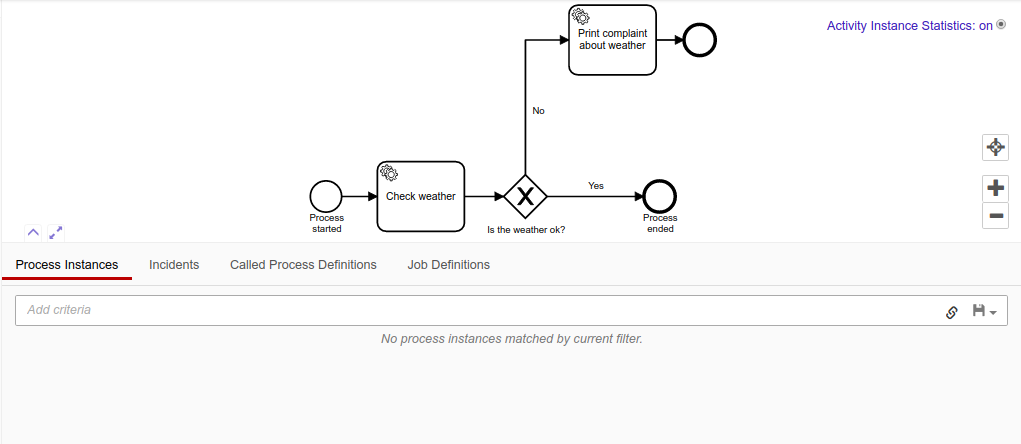
Hi, i watched the camunda learning videos and like that i created a simple weathcer check process with spring boot. Just like in the second video i did my development. Then using REST api i started my workflow. Down below is the response.
{http://localhost:8080/engine-rest/process-instance/fde05420-56c3-11ea-a0ce-0242a20b4513 ”,
Then i checked the process in the cockpit and it shows like below.
Then i tried to get the task using process definition key using REST api. (http://localhost:8080/engine-rest/task?processDefinitionKey=SimpleDemo ) and response from that api call looks like this →
What am i doing wrong?
Niall
February 24, 2020, 7:45am
2
The reason that you don’t see anything in cockpit is because the view in cockpit only shows currently running instances.
To validate that it has happened you can query the history of the engine via the REST API
oh thanks it is there. In the tutorial LoggerDelegate.java log some details. But in here i don’t have any message in the log. What may be the problem?
Niall
February 24, 2020, 8:05am
4
Indeed - you print something to the log in your delegate you’ll see the output in the console.
Is your logging configured correctly?logback.xml in src/main/resources
<configuration>
    <appender name="STDOUT" class="ch.qos.logback.core.ConsoleAppender">
        <!-- encoders are assigned the type ch.qos.logback.classic.encoder.PatternLayoutEncoder by default -->
        <encoder>
            <pattern>%d{HH:mm:ss.SSS} [%thread] %-5level %logger{36} - %msg%n</pattern>
        </encoder>
    </appender>

    <root level="debug">
        <appender-ref ref="STDOUT" />
    </root>

    <logger name="org.apache.ibatis" level="info" />
    <logger name="javax.activation" level="info" />
    <logger name="org.springframework" level="info" />

    <logger name="org.camunda" level="info" />
</configuration>
If you have the REST API configured, the you can easily check for the process instance using: http://localhost:8080/rest/history/process-instance