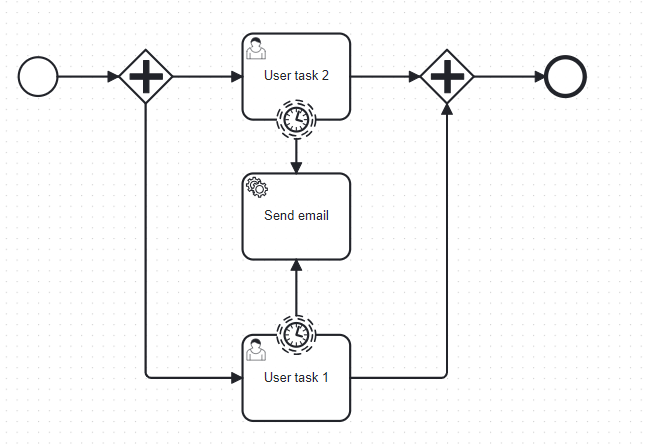
I’m facing an issue with a process where I have a user task implemented by a job worker.
When the task is created, the job worker returns some data that I store in the local scope of the user task. After some time, I need to send an email using this data.
However, as far as I understand, boundary events cannot read local variables of the user task. When I define output mappings on the boundary event, it can only access global variables, not the local ones.
What is the correct way to handle this?
Sending the data to the global scope is not an option, because in case of parallel executions of user tasks, the data would be overwritten each time.
How can I properly access the local variables from the boundary event, or what alternative pattern should I use?
You’re absolutely correct in your understanding - boundary events cannot access local variables from the user task they’re attached to. This is by design in BPMN, as boundary events are modeled outside the scope of the activity they’re attached to.
The Problem
Boundary events can only access global variables, not local variables from the attached task
Local variables are scoped to the specific task/subprocess and aren’t visible to boundary events
Using global scope isn’t suitable for parallel executions as you mentioned
Recommended Solution: Event Subprocess Pattern
The documented alternative is to use an event subprocess with a timer start event. Here’s how to restructure your process:
Wrap your user task in an embedded subprocess
Add an event subprocess inside that embedded subprocess with a timer start event
The event subprocess can access all local variables from its containing scope
Why This Works
An event subprocess lives inside the same scope as the user task (within the embedded subprocess)
It can “access and modify all local variables of its containing scope” according to the documentation
This gives you the same timeout behavior as a boundary timer, but with access to local variables
Process Structure
Embedded Subprocess
├── User Task (with local variables)
└── Event Subprocess (interrupting/non-interrupting)
    └── Timer Start Event → Email Task
Alternative: Updatable Timer Pattern
If the event subprocess approach doesn’t fit your needs, you could also consider the Updatable Boundary Timer Pattern, though this would require restructuring how you handle the timing logic.
The event subprocess approach is the most straightforward solution that maintains your current logic while giving you access to the local variables you need.
Would you like me to elaborate on any part of this solution?