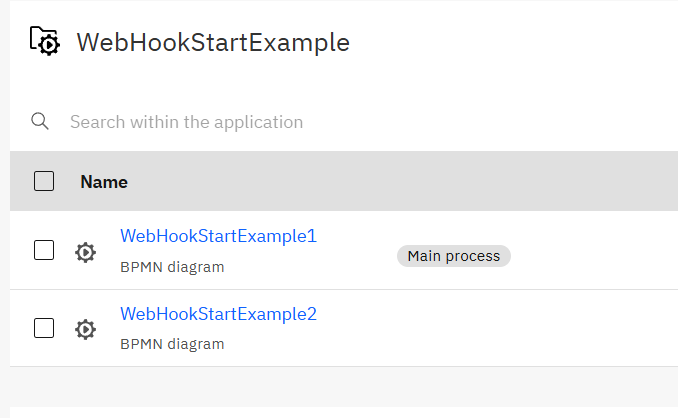
Thank you for the detailed report with screenshots and version information. This behavior is definitely not expected - each webhook start event with a unique webhook ID should only trigger its associated process definition.
Based on the official documentation, each HTTP Webhook connector with a unique Webhook ID should generate a distinct endpoint URL, and only calls to that specific URL should start the corresponding process instance.
Troubleshooting Steps
Let’s try to identify the root cause:
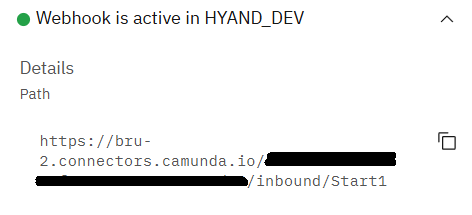
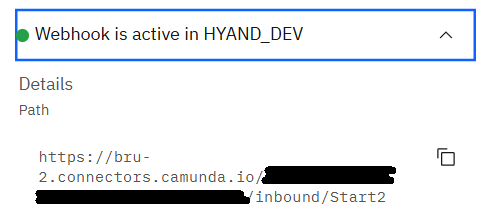
Verify Webhook URLs: After deploying both processes, check the actual webhook URLs generated:
In Web Modeler, select each webhook start event
In the properties panel, verify that each shows a different webhook URL
Make sure you’re calling the correct URLs for each test
Check Process Deployment:
Ensure both processes are properly deployed and active
Verify that the process IDs are different
Try redeploying both processes to ensure clean deployment state
Webhook ID Verification:
Double-check that “Start1” and “Start2” are indeed different
Ensure there are no hidden characters or spaces
Test Isolation:
Try deploying only one process at a time to see if the issue persists
Test with completely different webhook IDs (e.g., “webhook-test-1”, “webhook-test-2”)
Potential Bug Report
Since this behavior is not documented and contradicts the expected functionality, this appears to be a bug that should be reported. If the troubleshooting steps above don’t resolve the issue, I recommend filing a bug report at the Camunda GitHub repository.
Could you try the troubleshooting steps above and let me know the results? This will help determine if it’s a configuration issue or confirm it as a bug that needs to be escalated.
This explains the issue perfectly. When you duplicate a BPMN process in Camunda Modeler, the hidden connector properties (including internal webhook identifiers) are also copied. Even though you changed the visible “Webhook ID” to “Start1” and “Start2”, there are likely hidden properties in the connector configuration that remained identical.
Root Cause
According to the connector templates documentation, inbound webhook connectors include hidden properties like inbound.context that may not be automatically regenerated when duplicating elements. This causes both webhook connectors to share the same internal identifiers, making them trigger both processes.
Solutions
Option 1: Clean Recreation (Recommended)
Delete the duplicated process completely
Create a new process from scratch (don’t duplicate)
Add a fresh webhook start event with “Start2” as the Webhook ID
Redeploy both processes
Option 2: Fix the Duplicated Process
Delete the webhook start event from the duplicated process
Add a completely new webhook start event (don’t copy/paste)
Configure it with “Start2” as the Webhook ID
Redeploy both processes
Option 3: Check BPMN XML (Advanced)
If you’re comfortable with XML, you can inspect the BPMN files and look for duplicate inbound.context or other hidden webhook properties that need to be made unique.
Prevention for Future
Always create new processes from scratch when you need different webhook endpoints
If you must duplicate, always replace (not just rename) any connector elements with fresh ones
This is a common gotcha with connector duplication. Thank you for sharing this insight - it will help other users avoid the same issue!
Could you try one of the solutions above and confirm it resolves the problem?
I was going to ask you to post both BPMN files to check for this.
A Webhook is a special type of Message Received Start event. If you start from “Process 1” and save as “Process 2” then the Message that they are looking for are the same one.
Thanks for your reply! I have also seen this behaviour.
In my opinion, this is OK as long as the webhook ID is not changed.
However, I would have expected changing the webhook ID to clearly separate the initial webhook/process and the updated webhook/process, resulting in only one process instance being created:
based on initial process definition for initial webhook or
based on updated process definition on updated webhook
You’re absolutely right, Bernd! That’s exactly the expected behavior - changing the webhook ID should create separate, independent webhook endpoints.
@GotnOGuts makes a great point about the underlying mechanism. Webhook start events are indeed a special type of Message Start Event, and when you duplicate a process, the message name (which is often hidden) gets copied along with other properties.
The Core Issue
Even when you change the visible “Webhook ID” from “Start1” to “Start2”, the underlying message name that both processes are listening for likely remains the same. This causes both processes to respond to either webhook call.
Verification Steps
To confirm this theory, could you:
Check the message names:
Select each webhook start event
In the properties panel, look for a “Message” or “Message Name” field
See if both processes show the same message name
Share the BPMN files: As @GotnOGuts suggested, if you can share both BPMN XML files (or just the start event portions), we can identify the exact duplicate properties.
Expected Fix
The solution should be to ensure each webhook start event has:
Unique Webhook ID (you already did this)
Unique Message Name (likely the missing piece)
Any other unique internal identifiers
This is definitely a UX issue - changing the Webhook ID should automatically generate unique underlying identifiers to prevent exactly this confusion.
Would you be able to check the message names or share the BPMN files so we can pinpoint the exact duplicate property?
This is not visible in the WebModeler UI and it is not changed, when the webhook ID is changed.
Hence, the user has to export the BPMN file, change the message definition and import the file again.

 Camunda versions (8.7 self-managed, 8.8.0-alpha4 SaaS) - already provided