Hello!
I don’t see how can I modify the dimensions of a task except by editing the XML of a process, in the diagram section. I must be missing something: the visual editor should have a way to modify those dimensions but I can’t find it.
Another fixed dimension causing me problems that I don’t know how to modify is the label of a data object. I’m trying to write the text “Report with Recommendations”, but the word “Recommendations” is so long that it is wrapped, and I don’t see how can I make that label boxing dimension wider so the word fix (see the attached image).
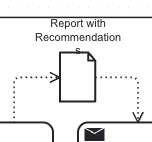
So:
- How to modify element dimensions in the graphical diagram editor?
- How to modify the label dimension of a Data Object element?
Thank you!