Hi everyone I was hoping someone could help me figuring out this problem:
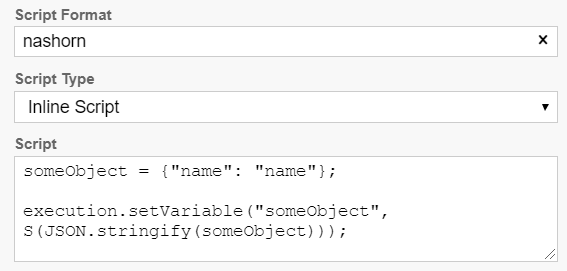
I’m trying to set a JSON variable in a script and want to use the script format as “nashorn” like the following example:
However, when the script runs I’m getting this error with spin:
“Unable to evaluate script while executing activity ‘Activity_10ikn3u’ in the process definition with id ‘AAAAA_TEST_SCRIPT:9:9607d385-7b3d-11ed-82b6-7ac5bff59a5a’:ReferenceError: “S” is not defined in at line number 3”
When use the script format “javascript” the script works fine, no issues. What is intriguing me is that I’m using the Camunda 7.15.1 docker image with tomcat version which I believe still uses Nashorn as the default javascript engine.
I was wondering if someone could help me find a way to set a json variable using “nashorn” as the script format.
Java version:
openjdk version “11.0.15” 2022-04-19
OpenJDK Runtime Environment (build 11.0.15+10-alpine-r0)
OpenJDK 64-Bit Server VM (build 11.0.15+10-alpine-r0, mixed mode)
To explain the bigger picture what we are aiming to do is migrating to Camunda 7.18 which uses the new graalVM javascript engine but we were trying to do it gradually like this:
Phase 1: Change scripts to use nashorn engine instead of using graalVM when Camunda is upgraded. We have tested changing scriptformat to “nashorn” and it works perfectly in Camunda 7.18 version. In version 7.15.1 we found this error with spin, everything else works just fine.
Phase 2: Upgrade Camunda to version 7.18
Phase 3: Migrating scripts to work with graalVM and using back “javascript” script format to point to this javascript engine.
That why we were trying to figure out how to make spin work with “nashorn” script format or trying to set JSON variables with any other method. If someone could give aditional advice on this it would help a lot.