Dear Camunda 7 Community,
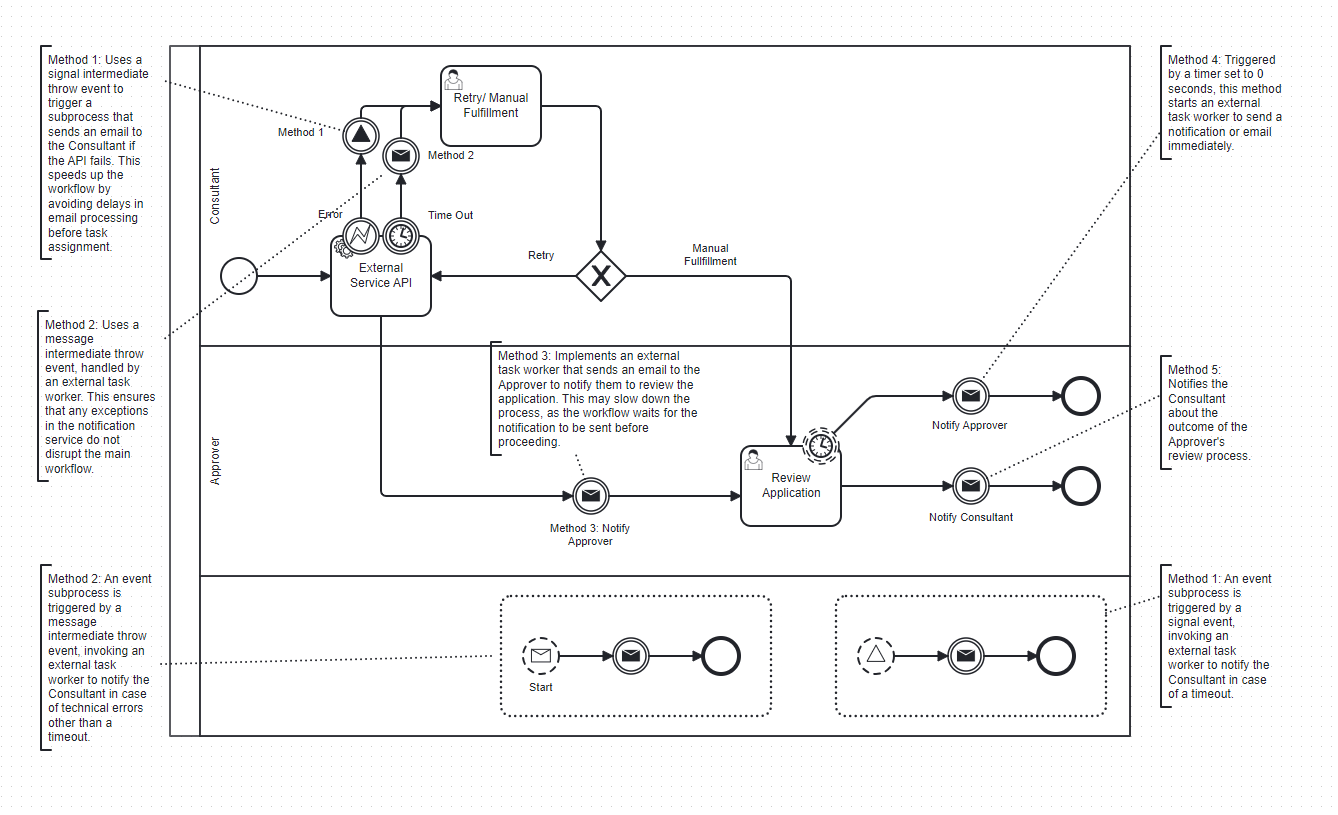
I am reaching out to request support regarding a persistent issue I’m facing in my Camunda 7-based workflow application. I’ve attached a BPMN diagram illustrating several strategies I’ve implemented in an effort to resolve the issue.
Problem Statement:
My external task workers are reprocessing tasks that should have already been completed. Specifically, my email notification service, which is triggered via an external task, is sending multiple emails when only one should be sent. This includes not just the intended email, but also previous emails that were already delivered to the same recipient.
A similar issue occurs in other services—such as one persisting audit logs to MongoDB, calling third-party APIs—where the external task is repeatedly invoked during the same process instance, resulting in duplicate records.
Approaches I Have Tried:
Outlined below are the five main methods I have tried (detailed in the attached workflow):
- Method 1: Signal Intermediate Throw Event + Non-Interrupting Event Subprocess
This design triggers an external task (email service) via a signal event. The flow remains fast and non-blocking. However, the issue of multiple email sends persists.
I suspect the broadcast nature of signal events and token splitting (between the main process and event subprocess) may be contributing factors. Additionally, in some instances, the token in the main flow becomes invisible while the subprocess token is visible but stuck on the external task. - Method 2: Message Intermediate Throw Event + Correlation via External Worker
Instead of signal events, I used a message intermediate throw event to trigger the event subprocess through a separate external task worker. This approach avoids broadcasting but is more code-intensive. Unfortunately, it resulted in the same duplication issue. - Method 3: Sequential External Task Call (No Subprocess)
Here, the message throw event directly calls an external task to send the email, resulting in a slower, synchronous flow—yet the duplication still occurred. - Method 4: Timer Boundary Event (Non-Interrupting, Duration = PT0S)
The timer boundary event was used to trigger the notification logic as soon as the user task was reached. While performance improved, the problem of duplicate emails and disappearing tokens persisted. In some cases, the workflow would only show tokens on the event subprocess and not the main process. - Method 5: Similar to Method 3
This also produced the same symptoms.
As a temporary workaround for MongoDB duplication, I implemented a flag-and-counter check within the worker to block redundant inserts. However, this is not ideal and adds unnecessary complexity.
Assumptions and Debugging Thoughts:
- I suspect the core issue may lie in external tasks not reaching
externalTaskService.complete(externalTask)after executing the core logic (e.g., sending an email or inserting a record). If the lock duration expires before task completion, it may be re-fetched and reprocessed. - This behavior occurs only in the deployed microservices, not in the local development environment. In fact, if I start the local version of the microservice while the deployed version is stuck, it seems to process pending tokens and restore normal behavior.
- I have verified that my external task clients subscribe properly and that exception handling is in place. However, this doesn’t seem to prevent the recurrence.
- Could expired locks or long execution times be causing Camunda to assume the task hasn’t been completed?
Request for Assistance:
At this point, I’m not sure whether the issue stems from the workflow model design, external task worker implementation, or a Camunda configuration setting. I would sincerely appreciate any guidance, debugging strategies, or suggestions from the community to help resolve this.
Please let me know if additional information—such as logs, BPMN details, or worker code—is required. I’m happy to provide further context. I have attached below my sample implementations:
example-workflow.bpmn (25.0 KB)
import jakarta.annotation.PostConstruct;
import org.camunda.bpm.client.ExternalTaskClient;
import org.camunda.bpm.client.task.ExternalTask;
import org.camunda.bpm.client.task.ExternalTaskService;
import org.slf4j.Logger;
import org.slf4j.LoggerFactory;
import org.springframework.beans.factory.annotation.Autowired;
import org.springframework.beans.factory.annotation.Value;
import org.springframework.stereotype.Component;
@Component
public class ExternalServiceWorker {
@Value(“${camunda.bpm.client.base-url}”)
private String camundaBaseUrl;
private static final Logger logger = LoggerFactory.getLogger(ExternalServiceWorker.class);

@PostConstruct
public void startCustomerVerificationTask() {

    ExternalTaskClient client = ExternalTaskClient.create()
            .baseUrl(camundaBaseUrl)
            .lockDuration(30000)
// .workerId(“kyc-worker-id”)
.build();
client.subscribe("method-1")
// .processDefinitionKey(STAKEHOLDERS_PROCESS)
.lockDuration(60000)
.handler(this::handleMethodOneTask)
.open();
    client.subscribe("method-2")
            .lockDuration(60000)
// .processDefinitionKey(PROCESS)
.handler(this::handleMethodTwoTask)
.open();
client.subscribe("method-3")
// .processDefinitionKey(STAKEHOLDERS_PROCESS)
.lockDuration(60000)
.handler(this::handleMethodThreeTask)
.open();
    client.subscribe("method-4")
            .lockDuration(60000)
// .processDefinitionKey(PROCESS)
.handler(this::handleMethodFourTask)
.open();
    client.subscribe("method-5")
            .lockDuration(60000)
// .processDefinitionKey(PROCESS)
.handler(this::handleMethodFiveTask)
.open();
}
private void handleMethodOneTask(ExternalTask externalTask, ExternalTaskService externalTaskService) {
logger.info(“Processing Method One Task…”);
try {
//send email
        externalTaskService.complete(externalTask);
    } catch (Exception e) {
        logger.error("Error processing Method One Task for business key '{}'.", externalTask.getBusinessKey(), e);
        externalTaskService.handleFailure(externalTask, "Error: " + e.getMessage(), e.getMessage(), 0, 5000);
    }
}
private void handleMethodTwoTask(ExternalTask externalTask, ExternalTaskService externalTaskService) {
    logger.info("Processing Method Two Task...");
    try {
        //send email

        externalTaskService.complete(externalTask);
    } catch (Exception e) {
        logger.error("Error processing Method One Task for business key '{}'.", externalTask.getBusinessKey(), e);
        externalTaskService.handleFailure(externalTask, "Error: " + e.getMessage(), e.getMessage(), 0, 5000);
    }
}
private void handleMethodThreeTask(ExternalTask externalTask, ExternalTaskService externalTaskService) {
    logger.info("Processing Method Three Task...");
    try {
        //send email

        externalTaskService.complete(externalTask);
    } catch (Exception e) {
        logger.error("Error processing Method One Task for business key '{}'.", externalTask.getBusinessKey(), e);
        externalTaskService.handleFailure(externalTask, "Error: " + e.getMessage(), e.getMessage(), 0, 5000);
    }
}
private void handleMethodFourTask(ExternalTask externalTask, ExternalTaskService externalTaskService) {
    logger.info("Processing Method Four Task...");
    try {
        //send email

        externalTaskService.complete(externalTask);
    } catch (Exception e) {
        logger.error("Error processing Method One Task for business key '{}'.", externalTask.getBusinessKey(), e);
        externalTaskService.handleFailure(externalTask, "Error: " + e.getMessage(), e.getMessage(), 0, 5000);
    }
}
private void handleMethodFiveTask(ExternalTask externalTask, ExternalTaskService externalTaskService) {
    logger.info("Processing Method Five Task...");
    try {
        //send email

        externalTaskService.complete(externalTask);
    } catch (Exception e) {
        logger.error("Error processing Method One Task for business key '{}'.", externalTask.getBusinessKey(), e);
        externalTaskService.handleFailure(externalTask, "Error: " + e.getMessage(), e.getMessage(), 0, 5000);
    }
}
}
---

Thank you in advance to everyone willing to assist. Your time and support are truly appreciated.