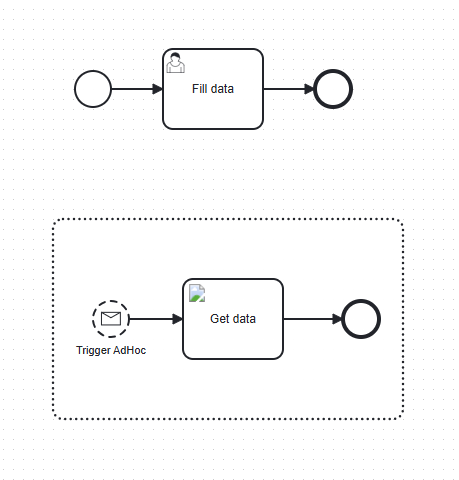
I am trying to implement in Camunda 8 an interactive Form, for example when UserTask is assigned, there will be a button to pull some data from REST API. I am thinking of having this button as a custom HTML or IFrame component that has a script to retrieved JSON data.
My question is - how to populate data into form after button is clicked, are there ways in external JS code to update data within form that was created by Camunda Modeler and uploaded?
I tried using form.importSchema(schema, data); but that does not bind to form “keys” that are supposed to be as a form output.
Maybe if that is not possible, can I use AdHoc process that is activated in user task form?
Great question about implementing interactive forms in Camunda 8! Based on your requirements, I can see you want to create a form with a button that calls a REST API and then populates form data dynamically.
Classification: General Question
The Challenge with Built-in Tasklist
Unfortunately, what you’re trying to achieve is not directly supported in Camunda’s built-in Tasklist:
You cannot execute custom JavaScript inside Camunda Form JSON schemas when using Tasklist
The form.importSchema(schema, data) approach you tried doesn’t work in Tasklist because it doesn’t support runtime script execution
Advanced interactive behaviors like REST API calls on button clicks require a different approach
Recommended Solution: Custom Task Application
For your use case, you’ll need to build a custom task application that:
Uses the Tasklist APIs to fetch and complete user tasks
Embeds @bpmn-io/form-js-viewer to render your Camunda forms
Provides full JavaScript control for REST API integration
Implementation Approach:
import { Form } from '@bpmn-io/form-js-viewer';

const form = new Form({
  container: document.querySelector('#form')
});

// Your form schema with a button/trigger field
const schema = {
  type: 'default',
  id: 'InteractiveForm',
  components: [
    {
      key: 'dataSource',
      label: 'Data Source',
      type: 'select',
      valuesExpression: '=external.api.options'
    },
    {
      key: 'triggerButton',
      label: 'Load Data',
      type: 'button'
    }
  ]
};

// Listen for form events (button clicks, field changes)
form.on('changed', async ({ data, errors }) => {
  // Detect when your trigger is activated
  if (data.triggerButton) {
    // Call your REST API
    const apiResponse = await fetch('/your-api-endpoint').then(r => r.json());

    // Update form data with API results
    const updatedData = {
      ...data,
      external: {
        api: {
          options: apiResponse.items
        }
      }
    };

    // Re-import schema with new data
    await form.importSchema(schema, updatedData);
  }
});

await form.importSchema(schema);
Key Points:
Use valuesExpression in your form components to bind to external data
Listen to form events (changed, formField.blur, etc.) as triggers
Re-import the schema with updated data after REST calls
The form will automatically update bound fields
Alternative: Custom Form Reference
If you prefer to build a completely custom UI, you can:
Set your user task to use a custom form reference instead of a Camunda form
Build your interactive form in any technology (React, Angular, vanilla JS)
Use the Tasklist REST/GraphQL APIs to complete tasks
AdHoc Process Alternative
Regarding your AdHoc process question - this wouldn’t solve the interactive form limitation. AdHoc processes are for dynamic process modeling, not for form interactivity. You’d still face the same constraints with form behavior in Tasklist.