I am running camunda 8.8 docker on linux, and my docker-compose.yaml is as attached below.
I am using external open id connect for authentication.
the external identity provider requires ssl, added the certificate to custom java trust store and mounted the trust store in the docker.
Docker is starting healthy, but when trying to access the identity component, it produces javax.net.ssl.SSLHandshakeException.
the docker-compose is attached.
docker-compose-camunda-forum.yaml (8.9 KB)
I added the ssl config to all components, but now I am getting a different error in orchestration:
orchestration | io.camunda.operate.util.RetryOperation - Retry Operation Connect to Elasticsearch cluster [elasticsearch] at ``http://localhost:9200`` failed: Connection refused
orchestration | java.net.ConnectException: Connection refused
orchestration | at org.elasticsearch.client.RestClient.extractAndWrapCause(RestClient.java:934)
orchestration | at org.elasticsearch.client.RestClient.performRequest(RestClient.java:304)
orchestration | at org.elasticsearch.client.RestClient.performRequest(RestClient.java:292)
orchestration | at co.elastic.clients.transport.rest_client.RestClientHttpClient.performRequest(RestClientHttpClient.java:92)
orchestration | at co.elastic.clients.transport.ElasticsearchTransportBase.performRequest(ElasticsearchTransportBase.java:145)
orchestration | at co.elastic.clients.elasticsearch.cluster.ElasticsearchClusterClient.health(ElasticsearchClusterClient.java:439)
orchestration | at io.camunda.operate.connect.ElasticsearchConnector.lambda$checkHealth$2(ElasticsearchConnector.java:157)
orchestration | at io.camunda.operate.util.RetryOperation.retry(RetryOperation.java:59)
orchestration | at io.camunda.operate.connect.ElasticsearchConnector.checkHealth(ElasticsearchConnector.java:162)
orchestration | at io.camunda.operate.connect.ElasticsearchConnector.elasticsearchClient(ElasticsearchConnector.java:131)
orchestration | at io.camunda.operate.connect.ElasticsearchConnector$$SpringCGLIB$$0.CGLIB$elasticsearchClient$1()
orchestration | at io.camunda.operate.connect.ElasticsearchConnector$$SpringCGLIB$$FastClass$$1.invoke()
docker-compose-camunda-forum.yaml (9.4 KB)
Hi @devmsaleh
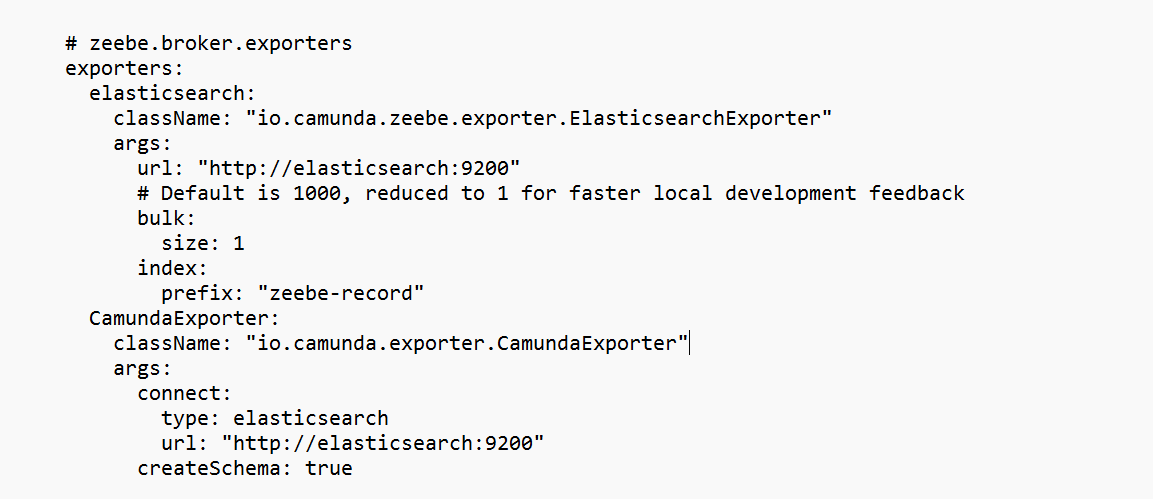
The CamundaExporter configuration is missing so it defaulted to localhost:9200
In the official Camunda compose file, they rely on the application.yaml

Try add the following
exporters:
  elasticsearch:
    className: "io.camunda.zeebe.exporter.ElasticsearchExporter"
    args:
      url: "http://elasticsearch:9200"
      # Default is 1000, reduced to 1 for faster local development feedback
      bulk:
        size: 1
      index:
        prefix: "zeebe-record"
  CamundaExporter:
    className: "io.camunda.exporter.CamundaExporter"
    args:
      connect:
        type: elasticsearch
        url: "http://elasticsearch:9200"
      createSchema: true
I found out the issue was indentation in the configs section in the bottom, after fixing it now I am getting javax.net.ssl.SSLHandshakeException in the connectors, below is my corrected docker file.
docker-compose-camunda-forum.yaml (9.6 KB)
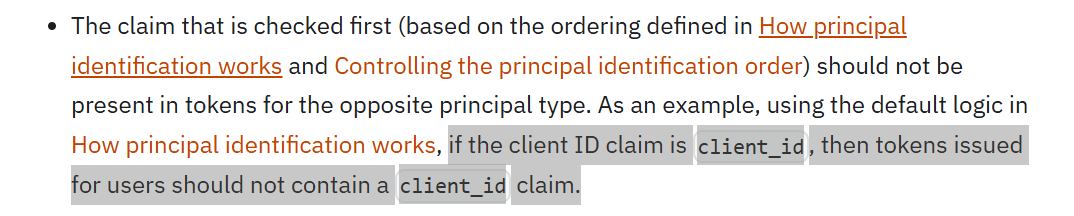
Please ensure that you followed the following recommendation for client ID and username claim configuration
the issue I am facing right now is javax.net.ssl.SSLHandshakeException in the connectors despite the correct configuration are in place
I was having a duplicate connector configuration, after correcting the docker file now I am getting a differenet error in connectors:
Caused by: java.lang.IllegalArgumentException: java.lang.NullPointerException: Expected valid client id but none was provided.
connectors | at io.camunda.client.impl.oauth.OAuthCredentialsProviderBuilder.validate(OAuthCredentialsProviderBuilder.java:515)
connectors | at io.camunda.client.impl.oauth.OAuthCredentialsProviderBuilder.build(OAuthCredentialsProviderBuilder.java:376)
connectors | at io.camunda.client.spring.configuration.CredentialsProviderConfiguration.buildOAuthCredentialsProvider(CredentialsProviderConfiguration.java:104)
connectors | at io.camunda.client.spring.configuration.CredentialsProviderConfiguration.camundaClientCredentialsProvider(CredentialsProviderConfiguration.java:48)
connectors | at io.camunda.client.spring.configuration.CredentialsProviderConfiguration$$SpringCGLIB$$0.CGLIB$camundaClientCredentialsProvider$0()
connectors | at io.camunda.client.spring.configuration.CredentialsProviderConfiguration$$SpringCGLIB$$FastClass$$1.invoke()
connectors | at org.springframework.cglib.proxy.MethodProxy.invokeSuper(MethodProxy.java:258)
connectors | at org.springframework.context.annotation.ConfigurationClassEnhancer$BeanMethodInterceptor.intercept(ConfigurationClassEnhancer.java:400)
connectors | at io.camunda.client.spring.configuration.CredentialsProviderConfiguration$$SpringCGLIB$$0.camundaClientCredentialsProvider()
connectors | at java.base/jdk.internal.reflect.DirectMethodHandleAccessor.invoke(Unknown Source)
connectors | at java.base/java.lang.reflect.Method.invoke(Unknown Source)
connectors | at org.springframework.beans.factory.support.SimpleInstantiationStrategy.lambda$instantiate$0(SimpleInstantiationStrategy.java:172)
connectors | … 153 common frames omitted
docker-compose-camunda-forum.yaml (9.6 KB)
@devmsaleh
You have both a config mount AND a volume mount
configs:
- source: connectors-config

  target: application.yaml
volumes:
- "./.connectors/application.yaml:/app/application.yaml"
So use only one approach and ensure it points to the right configs as you are overriding spring behavior to only look at /app/application.yaml.
environment:
SPRING_CONFIG_LOCATION: /app/application.yaml
docker-compose-camunda-forum.yaml (8.9 KB)
when using the connectors config under environment only, now I get the error:
Caused by: javax.net.ssl.SSLHandshakeException: PKIX path building failed: sun.security.provider.certpath.SunCertPathBuilderException: unable to find valid certification path to requested target
while the custom truststore is added under the connector environment JAVA_TOOL_OPTIONS and I verified that the customTrustStore exists inside the connectos image using:
docker exec -it connectors sh -lc ‘ls -l /opt/certs && ls -l /opt/certs/customTrustStore.jks’
also when Run Java with “show settings” inside the container:
docker exec -it connectors sh -lc ‘java -XshowSettings:properties -version 2>&1 | grep -E “trustStore|trustStorePassword|trustStoreType”’
it prints the correct customTrustStore setted in java opts as follows:
Picked up JAVA_TOOL_OPTIONS: -Djavax.net.ssl.trustStore=/opt/certs/customTrustStore.jks -Djavax.net.ssl.trustStorePassword=changeit -Djavax.net.ssl.trustStoreType=JKS
javax.net.ssl.trustStore = /opt/certs/customTrustStore.jks
javax.net.ssl.trustStorePassword = changeit
javax.net.ssl.trustStoreType = JKS
Update (attached connectors startup logs).
camunda-connectors-logs.yaml (3.6 KB)
Update: I tried copying the customTrustStore from different server, which is working fine on c8run, but this also gives same error.
@hassang @zee-bot @nathan.loding any ideas can help why connectors is printing javax.net.ssl.SSLHandshakeException despite proper configuration is in place I guess ?