Hi everyone,
I’ve encountered an issue with process instance migration in Camunda 8.7.12 and was hoping for some insights.
Problem Description: When I try to migrate a process instance that is waiting for multiple tokens to arrive at a joining parallel gateway, the migration consistently fails.
My process involves a parallel gateway that splits the flow into two branches. One branch contains a User Task, while the other flows directly to the joining parallel gateway. After starting an instance, it enters a state with one token at the User Task and a second token already waiting at the joining gateway for the other one to arrive. Attempting to migrate the instance in this state fails:
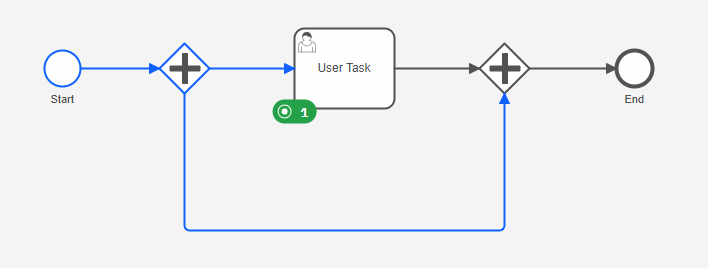
Steps to Reproduce
-
Deploy the process definition:
MigrationBug.bpmn (4.3 KB)
-
Start a new process instance.
-
Observe that the instance is now active with a token at the “User Task”.
-
Make a minor change to the process definition (e.g., rename the User Task).
-
Deploy this new version.
-
Attempt to migrate the running process instance to the new definition.
Actual Behavior: The migration operation fails.
Expected Behavior: The migration should succeed, allowing the process instance to continue in the new version while maintaining its state (i.e., still waiting at the User Task).
Has anyone else experienced this behavior? Any information on whether this is a known limitation or a potential bug would be greatly appreciated. I’ve also created a Github issue on this bug: Process migration fails for instances waiting at a joining parallel gateway · Issue #46281 · camunda/camunda · GitHub
Thanks for your help!

 Hints: Use the Ask AI feature in