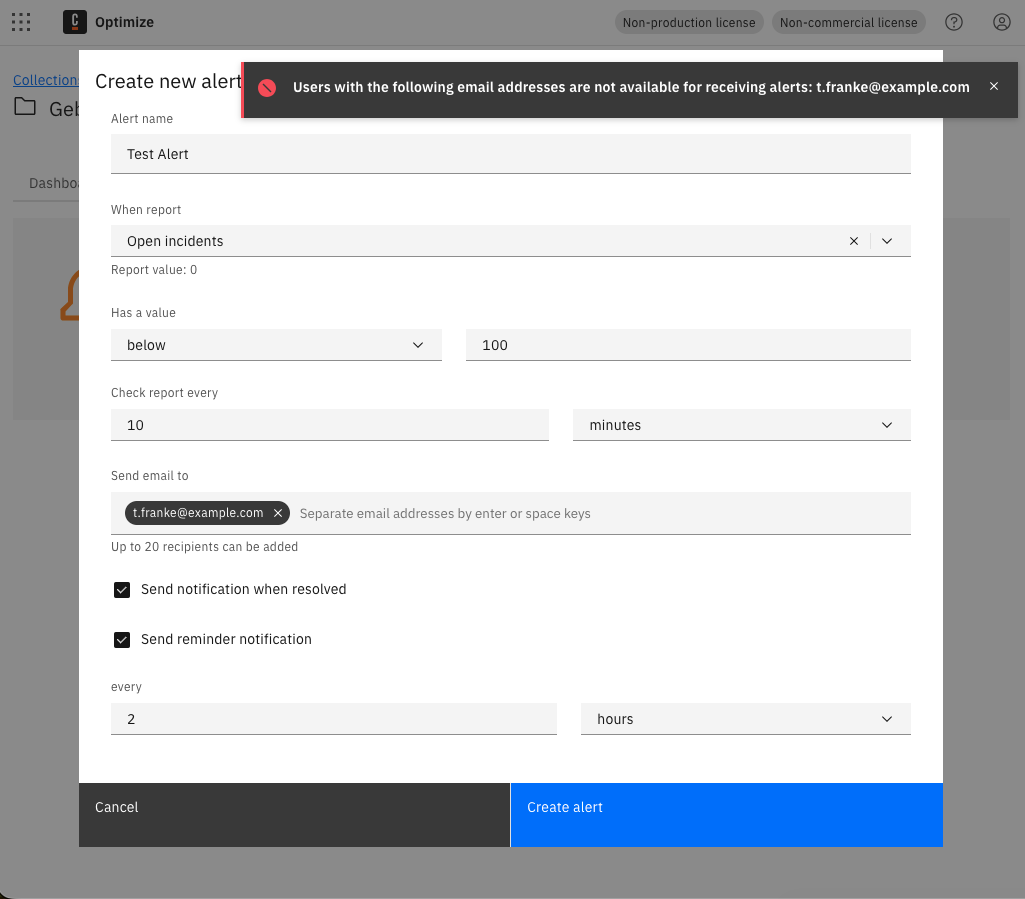
Hi,
We want to use the alerting feature in Optimize, but it looks like we can only add email addresses that belong to users already registered in Camunda/Keycloak.
Is that really the intended behavior? If so, is there any way to disable this restriction?
From a UX perspective, this is pretty misleading. The field is labeled “email”, but apparently it does not accept arbitrary email addresses — only known users. That is not the same thing. If the system only supports users, the field should say “user”, not “email”.
This also raises some practical concerns:
- How are we supposed to use shared mailboxes or distribution lists?
- Do we really need to create fake/keycloak-only users just to notify a team?
- What happens when a user leaves the company and their account is disabled?
- How are alerts supposed to be routed to operational teams instead of individuals?
- Is this behavior documented anywhere, or is it just something users discover after trying to configure alerts?
Honestly, this feels unnecessarily restrictive and badly designed for production use. Alerting should support operational notification patterns, not force everything through individual identity accounts.
Is anyone actually using this feature in production? If yes, how are you working around these limitations?
You’re correct that Optimize alerts are restricted to registered users only - this is the intended behavior for both SaaS (Console users) and Self-Managed (Identity/Keycloak users). I found the following relevant resources:
Does this help? If not, can anyone from the community jump in? 
 Hints: Use the Ask AI feature in Camunda’s documentation to chat with AI and get fast help. Report bugs and features in Camuda’s GitHub issue tracker. Trust the process.
The CVE explains why arbitrary email input needs to be handled carefully, but it does not explain why this must be completely disabled for every self-managed setup.
In our case, Camunda is deployed internally and Optimize is only accessible to logged-in users. The risk profile is therefore very different from a public SaaS environment.
Why is there no feature flag/configuration option for this? For example:
- allow arbitrary recipients
- restrict recipients to registered users
- allow only specific domains
- use an admin-defined allowlist
Right now, this makes alerting much less useful in production because we cannot use distribution lists or shared team mailboxes without creating fake users. That feels like a workaround for a product limitation, not a proper solution.
I have a more general question about this forum.
What is the purpose of the Camunda forum? Is it intended to be a community forum only, or is it also a place where Camunda staff provide product explanations and answer design questions?
At the moment, it feels like most new topics are only getting an automated reply from the bot. I can prompt an AI myself—I came here because I was hoping for input from the people who actually build and maintain the product, or at least from someone who can explain the reasoning behind certain design decisions.
Is there anyone from the Camunda team actively monitoring these discussions, or should we assume that product-related questions are unlikely to receive an official response?
Right now, the forum feels rather inactive, and that’s honestly a bit disappointing.
I agree, but I’m not sure how to change it.
As far as I understand it, this is intended to be a place for users to compare notes, and has been documented that it is not an official Camunda Support Channel, so there is no promise that you will get a reply from a Camunda staffer.