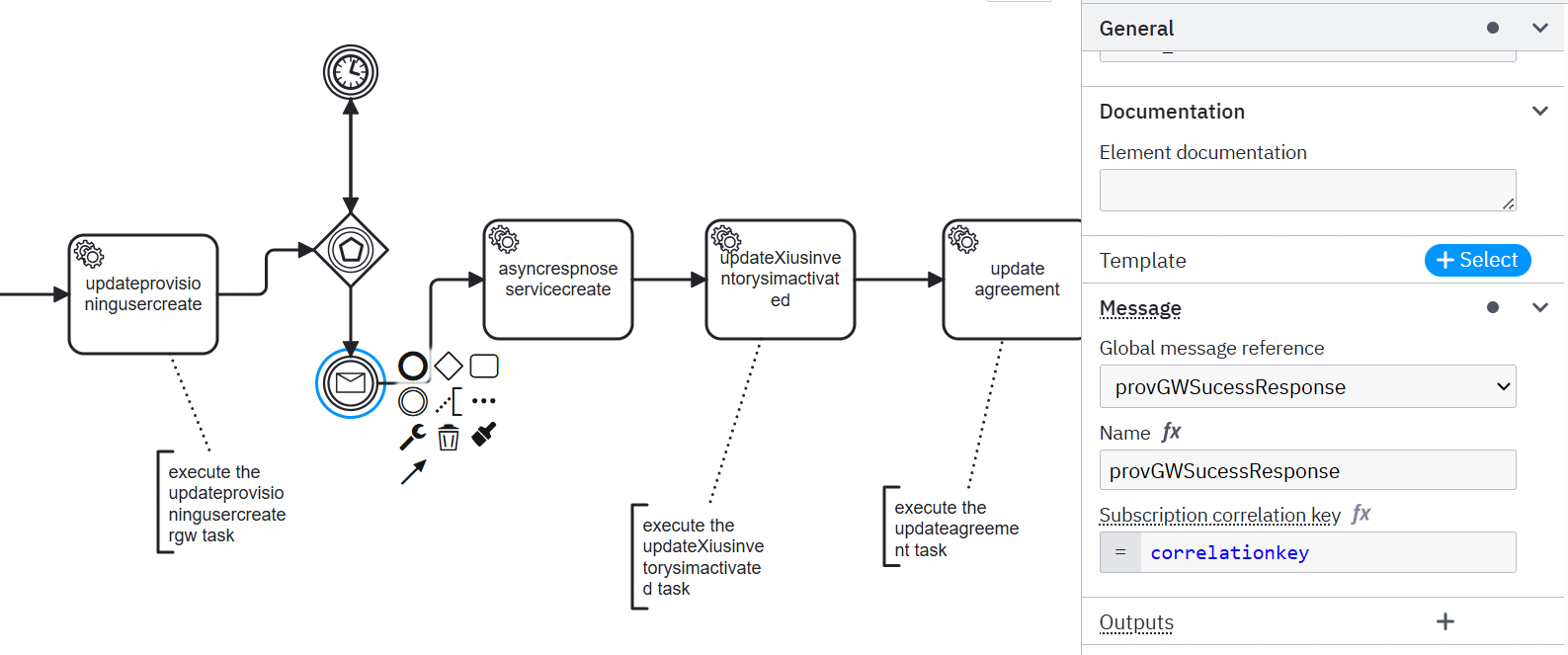
We are facing intermittently in production that in our workflow process variables are not merging to workflow hence correlation(message subscription) is not happening and workflow is not moving further.
Also observe the errors in Camunda ES index:
“errorType”: “EXTRACT_VALUE_ERROR”,
“errorMessage”: “”"Failed to extract the correlation key for ‘correlationkey’: The value must be either a string or a number, but was ‘NULL’. The evaluation reported the following warnings:
[NO_VARIABLE_FOUND] No variable found with name ‘correlationkey’“”"
This is a Problem classification - you’re experiencing intermittent correlation failures in production due to NULL correlation keys and missing variables.
Based on the error you’re seeing (EXTRACT_VALUE_ERROR with NULL correlation key and NO_VARIABLE_FOUND), here’s what’s likely happening and how to troubleshoot:
Root Cause Analysis
The error indicates that:
Correlation key evaluates to null when the message subscription is activated
The variable referenced in your correlation key expression doesn’t exist at that point in the process
Key Areas to Check
1. Correlation Key Configuration
Open your BPMN in Camunda Modeler
Check the Message definition used by your receive task/intermediate catch event
Verify the Correlation key field (e.g., =correlationkey)
Ensure the referenced variable exists and is non-null before the process reaches the message catch event
2. Variable Timing Issues
Since this is intermittent, the most likely cause is a race condition where:
Sometimes the correlation variable is set before the message subscription is created
Sometimes the message arrives before the variable is available
To verify:
In Operate, inspect a failing process instance
Check if the correlationkey variable exists and has a value when the token reaches the message catch event
Look at the variable history to see when it was set vs when the subscription was created
3. Variable Merging Issues
For the “variables not merging” part:
Check Variable mappings on your message events
If you have output mappings configured, only mapped variables will be merged
Remove output mappings to merge all variables, or explicitly map the ones you need
4. Message Publishing
Ensure that:
Message name matches exactly between BPMN and your message publisher
Correlation key value sent from your client matches the process variable value
If using connectors, verify the Correlation key (payload) expression extracts the correct value
Immediate Actions
Check your process timing - ensure correlation variables are set before message subscriptions
Review variable mappings on your message events
Verify correlation key expressions in your BPMN message definitions
Monitor variable creation timing in failing instances
Need More Help?
To provide more specific guidance, could you share:
Your Camunda version
Environment (SaaS/Self-Managed)
The relevant BPMN snippet showing the message definition and correlation key
How you’re publishing the message (client code or connector configuration)