Hello.
Im trying to set my camunda application cache capacity to a certain value following this guide
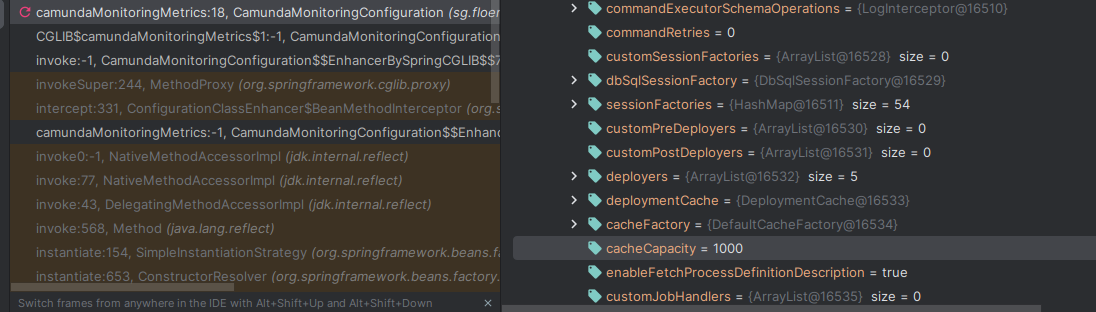
However, by running locally and enabling debugger, i can check the cache capacity still at default value: 1000
Is there any step that im missing?
Hello.
Im trying to set my camunda application cache capacity to a certain value following this guide
However, by running locally and enabling debugger, i can check the cache capacity still at default value: 1000
Is there any step that im missing?
Hello @abu_talha
Could you share the configuration file you use to set the cache capacity?
Regards,
Alex
Thanks for prompt reply Alex!
here you go
<?xml version="1.0" encoding="UTF-8"?>
<beans xmlns="http://www.springframework.org/schema/beans"
       xmlns:xsi="http://www.w3.org/2001/XMLSchema-instance"
       xsi:schemaLocation="http://www.springframework.org/schema/beans   http://www.springframework.org/schema/beans/spring-beans.xsd">

    <bean id="processEngineConfiguration" class="org.camunda.bpm.engine.impl.cfg.StandaloneInMemProcessEngineConfiguration">
<!--        Default is set at 1000 as per this doc-->
<!--        https://docs.camunda.org/manual/latest/user-guide/process-engine/deployment-cache/#customize-the-maximum-capacity-of-the-cache-->
        <property name="cacheCapacity" value="5" />
    </bean>
</beans>
I have also tried using this class:
org.camunda.bpm.engine.spring.SpringProcessEngineConfiguration
also here the screenshot of the processEngine inspection:
Hello my friend!
Did you implement the cache classes as a MyCacheFactory extending CacheFactory and overriding the createCache() method?
can you show us?
William Robert Alves
Thank you for your reply @WilliamR.Alves
We do not implemented custom cache classes for this configuration, only cacheCapacity
hope this answer your question
Ok so no customization needed!
In which file did you place the cache config?
In which folder/path is this file saved?
After the adjustment you made to the file, did you restart the application?
we set the cacheConfing on this file camunda.cfg.xml and saved under src/main/kotlin/resources folder
yup, we do restart the application
Is your Camunda implementation embedded with Spring?
If so… try changing the “class” attribute in your xml file.
class=“org.camunda.bpm.engine.spring.SpringProcessEngineConfiguration”.
And restart the application.
William Robert Alves