Hello every one,
I’m new in the community.
I have a quarkus application, deployed a simple process, so I try to complete user task with API REST
with the endpoint: /v1/tasks/{taskId}/complete.
I received response code 401.
Where can I get the authentication to access it?
Hi @Charles_Andrea, welcome to the forums! Are you using SaaS or a Self-Managed deployment?
hi @nathan.loding, I’m using self managed in local.
@Charles_Andrea - are you using C8 Run or a Docker setup? Did you configure your local cluster with Identity or basic auth? If you’re using Identity, you can configure a new application and use the key provided to authenticate; if you’re using basic auth - which is what C8 Run uses - you need to fetch a cookie and use that.
1 Like
I use docker setup. I want to use keycloak as Identity.
@Charles_Andrea - if you used our docker-compose.yaml configuration, rather than docker-compose-core.yaml, then Identity is included. If you customized your own Docker config, can you share your config?
Keycloak does not replace Identity; rather, Identity is the glue that allows the full Camunda stack to use Keycloak and other OIDC providers. If you used our Docker config, and you log in to Identity, there is some configuration already created for you. You need to ensure the key you are using has permissions to the Tasklist API, or create a new application with those permissions.
hi @nathan.loding
thanks again for your support , here is my docker-compose.yml file:
# While the Docker images themselves are supported for production usage,
# this docker-compose.yaml is designed to be used by developers to run
# an environment locally. It is not designed to be used in production.
# We recommend to use Kubernetes in production with our Helm Charts:
# https://docs.camunda.io/docs/self-managed/platform-deployment/kubernetes-helm/
# For local development, we recommend using KIND instead of `docker-compose`:
# https://docs.camunda.io/docs/self-managed/platform-deployment/helm-kubernetes/guides/local-kubernetes-cluster/

# This is a lightweight configuration with Zeebe, Operate, Tasklist, and Elasticsearch
# See docker-compose.yml for a configuration that also includes Optimize, Identity, and Keycloak.

services:

  zeebe: # https://docs.camunda.io/docs/self-managed/platform-deployment/docker/#zeebe

    image: camunda/zeebe:${CAMUNDA_PLATFORM_VERSION}
    container_name: zeebe
    ports:
      - "26500:26500"
      - "9600:9600"
    environment: # https://docs.camunda.io/docs/self-managed/zeebe-deployment/configuration/environment-variables/
      - ZEEBE_BROKER_EXPORTERS_ELASTICSEARCH_CLASSNAME=io.camunda.zeebe.exporter.ElasticsearchExporter
      - ZEEBE_BROKER_EXPORTERS_ELASTICSEARCH_ARGS_URL=http://elasticsearch:9200
      # default is 1000, see here: https://github.com/camunda/zeebe/blob/main/exporters/elasticsearch-exporter/src/main/java/io/camunda/zeebe/exporter/ElasticsearchExporterConfiguration.java#L259
      - ZEEBE_BROKER_EXPORTERS_ELASTICSEARCH_ARGS_BULK_SIZE=1
      # allow running with low disk space
      - ZEEBE_BROKER_DATA_DISKUSAGECOMMANDWATERMARK=0.998
      - ZEEBE_BROKER_DATA_DISKUSAGEREPLICATIONWATERMARK=0.999
      - "JAVA_TOOL_OPTIONS=-Xms512m -Xmx512m"
    restart: always
    healthcheck:
      test: [ "CMD-SHELL", "timeout 10s bash -c ':> /dev/tcp/127.0.0.1/9600' || exit 1" ]
      interval: 30s
      timeout: 5s
      retries: 5
      start_period: 30s
    volumes:
      - zeebe:/usr/local/zeebe/data
    networks:
      - camunda-platform
    depends_on:
      - elasticsearch

  operate: # https://docs.camunda.io/docs/self-managed/platform-deployment/docker/#operate
    image: camunda/operate:${CAMUNDA_PLATFORM_VERSION}
    container_name: operate
    ports:
      - "8081:8080"
    environment: # https://docs.camunda.io/docs/self-managed/operate-deployment/configuration/
      - CAMUNDA_OPERATE_ZEEBE_GATEWAYADDRESS=zeebe:26500
      - CAMUNDA_OPERATE_ELASTICSEARCH_URL=http://elasticsearch:9200
      - CAMUNDA_OPERATE_ZEEBEELASTICSEARCH_URL=http://elasticsearch:9200
      - management.endpoints.web.exposure.include=health
      - management.endpoint.health.probes.enabled=true
    healthcheck:
      test: [ "CMD-SHELL", "wget -O - -q 'http://localhost:8080/actuator/health/readiness'" ]
      interval: 30s
      timeout: 1s
      retries: 5
      start_period: 30s
    networks:
      - camunda-platform
    depends_on:
      - zeebe
      - elasticsearch

  identity:
    container_name: identity
    image: camunda/identity:${CAMUNDA_PLATFORM_VERSION}
    ports:
      - "8084:8084"
    environment:
      SERVER_PORT: 8084
      IDENTITY_RETRY_DELAY_SECONDS: 30
      KEYCLOAK_URL: http://keycloak:8080/auth
      IDENTITY_AUTH_PROVIDER_BACKEND_URL: http://keycloak:8080/auth/realms/camunda-platform-realm
      KEYCLOAK_INIT_OPERATE_SECRET: XALaRPl5qwTEItdwCMiPS62nVpKs7dL7
      KEYCLOAK_INIT_TASKLIST_SECRET: XALaRPl5qwTEItdwCMiPS62nVpKs7dL7
      KEYCLOAK_INIT_OPERATE_ROOT_URL: http://operate:8081
      KEYCLOAK_INIT_TASKLIST_ROOT_URL: http://tasklist:8082
      KEYCLOAK_USERS_0_USERNAME: "demo"
      KEYCLOAK_USERS_0_PASSWORD: "demo"
      KEYCLOAK_USERS_0_FIRST_NAME: "demo"
      KEYCLOAK_USERS_0_ROLES_0: "Identity"
      KEYCLOAK_USERS_0_ROLES_1: "Optimize"
      KEYCLOAK_USERS_0_ROLES_2: "Operate"
      KEYCLOAK_USERS_0_ROLES_3: "Tasklist"
    restart: on-failure
    networks:
      - camunda-platform
    depends_on:
      - keycloak

  tasklist: # https://docs.camunda.io/docs/self-managed/platform-deployment/docker/#tasklist
    image: camunda/tasklist:${CAMUNDA_PLATFORM_VERSION}
    container_name: tasklist
    ports:
      - "8082:8080"
    environment: # https://docs.camunda.io/docs/self-managed/tasklist-deployment/configuration/
      - CAMUNDA_TASKLIST_ZEEBE_GATEWAYADDRESS=zeebe:26500
      - CAMUNDA_TASKLIST_ELASTICSEARCH_URL=http://elasticsearch:9200
      - CAMUNDA_TASKLIST_ZEEBEELASTICSEARCH_URL=http://elasticsearch:9200
      - management.endpoints.web.exposure.include=health
      - management.endpoint.health.probes.enabled=true
    healthcheck:
      test: [ "CMD-SHELL", "curl -f http://localhost:8080/actuator/health/readiness" ]
      interval: 30s
      timeout: 1s
      retries: 5
      start_period: 30s
    networks:
      - camunda-platform
    depends_on:
      - zeebe
      - elasticsearch

  connectors: # https://docs.camunda.io/docs/components/integration-framework/connectors/out-of-the-box-connectors/available-connectors-overview/
    image: camunda/connectors-bundle:${CAMUNDA_CONNECTORS_VERSION}
    container_name: connectors
    ports:
      - "8085:8080"
    environment:
      - ZEEBE_CLIENT_BROKER_GATEWAY-ADDRESS=zeebe:26500
      - ZEEBE_CLIENT_SECURITY_PLAINTEXT=true
      - CAMUNDA_OPERATE_CLIENT_URL=http://operate:8080
      - CAMUNDA_OPERATE_CLIENT_USERNAME=demo
      - CAMUNDA_OPERATE_CLIENT_PASSWORD=demo
      - management.endpoints.web.exposure.include=health
      - management.endpoint.health.probes.enabled=true
    healthcheck:
      test: [ "CMD-SHELL", "curl -f http://localhost:8080/actuator/health/readiness" ]
      interval: 30s
      timeout: 1s
      retries: 5
      start_period: 30s
    env_file: connector-secrets.txt
    networks:
      - camunda-platform
    depends_on:
      - zeebe
      - operate

  elasticsearch: # https://hub.docker.com/_/elasticsearch
    image: docker.elastic.co/elasticsearch/elasticsearch:${ELASTIC_VERSION}
    container_name: elasticsearch
    ports:
      - "9200:9200"
      - "9300:9300"
    environment:
      - bootstrap.memory_lock=true
      - discovery.type=single-node
      - xpack.security.enabled=false
      # allow running with low disk space
      - cluster.routing.allocation.disk.threshold_enabled=false
      - "ES_JAVA_OPTS=-Xms512m -Xmx512m"
    ulimits:
      memlock:
        soft: -1
        hard: -1
    restart: always
    healthcheck:
      test: [ "CMD-SHELL", "curl -f http://localhost:9200/_cat/health | grep -q green" ]
      interval: 30s
      timeout: 5s
      retries: 3
    volumes:
      - elastic:/usr/share/elasticsearch/data
    networks:
      - camunda-platform

  kibana:
    image: docker.elastic.co/kibana/kibana:${ELASTIC_VERSION}
    container_name: kibana
    ports:
      - 5601:5601
    volumes:
      - kibana:/usr/share/kibana/data
    networks:
      - camunda-platform
    depends_on:
      - elasticsearch
    profiles:
      - kibana

  keycloak:
    container_name: keycloak
    image: quay.io/keycloak/keycloak:26.3.2
    ports:
      - "8080:8080"
    environment:
      - KC_BOOTSTRAP_ADMIN_USERNAME=admin
      - KC_BOOTSTRAP_ADMIN_PASSWORD=admin
    command: start-dev
    networks:
      - camunda-platform
volumes:
  zeebe:
  elastic:
  kibana:

networks:
  camunda-platform:
@Charles_Andrea - this config has both Identity and Keycloak, so you need to log into Identity (localhost:8084, u/p is “demo”) and configure the API permissions per the link shared earlier.
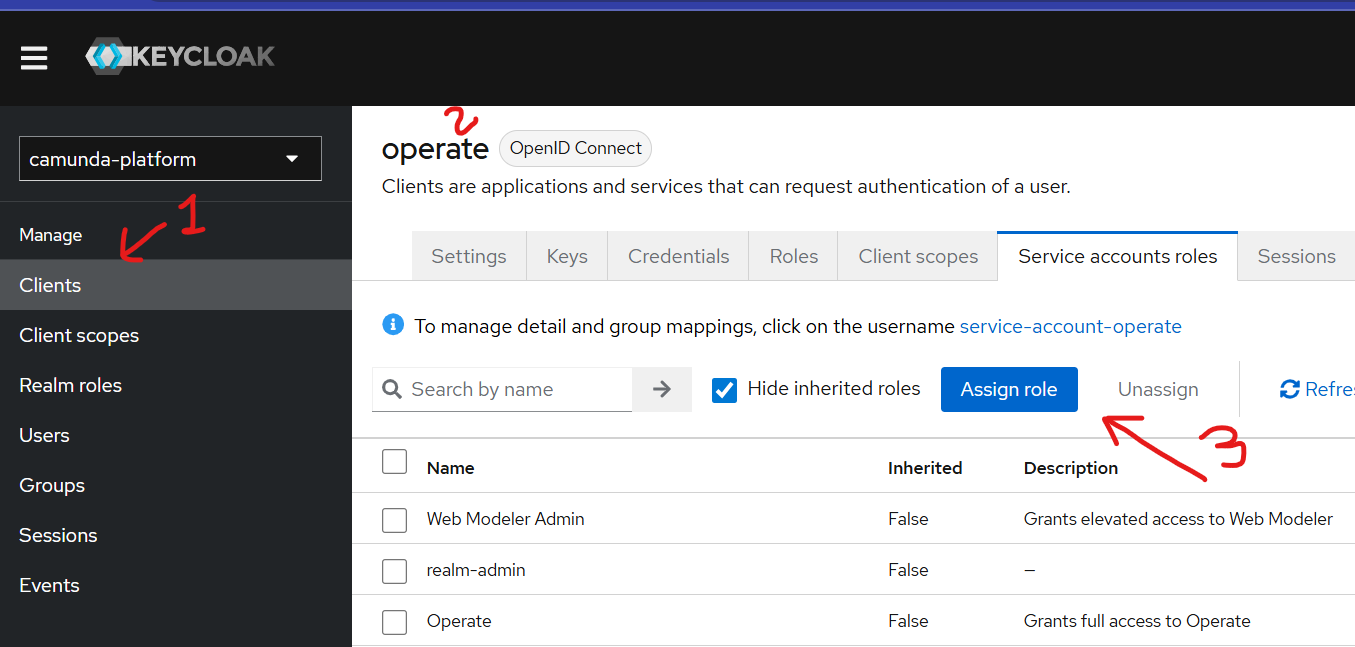
You can solve this by going to clients in Keycloak and assigning all necessary permissions to the operate client:
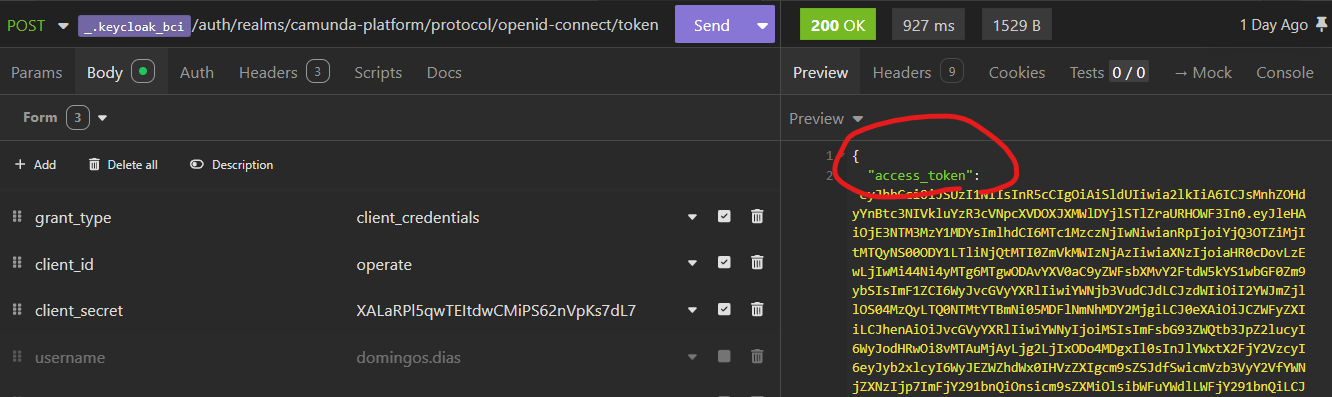
Remember that you need to authenticate, so you first need to generate a JWT:
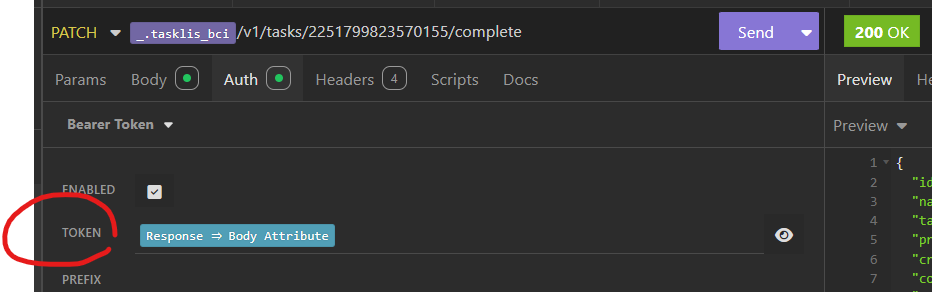
You will use this JWT in Cachama to complete the task:
Thank you all,
The main off my problem is that identity is unable to connect to keycloak,
I try to solve it by this solution
but i have the same error in identity:
camunda-identity | 2025-07-31 07:18:05.943 WARN 1 — [ main] i.c.i.i.k.c.KeycloakConfiguration : Retrying…
camunda-identity | 2025-07-31 07:18:06.154 ERROR 1 — [ main] i.c.i.i.k.c.KeycloakConfiguration : Failure #2. Unable to connect to Keycloak.
what is wrong in my config?
services:

  camunda-identity:
    container_name: camunda-identity
    image: camunda/identity:${CAMUNDA_PLATFORM_VERSION}
    ports:
      - "8084:8084"
    environment:
      SERVER_PORT: 8084
      IDENTITY_RETRY_DELAY_SECONDS: 30
      KEYCLOAK_URL: http://keycloak:8080/auth
      IDENTITY_AUTH_PROVIDER_BACKEND_URL: http://keycloak:8080/auth/realms/camunda-platform
      IDENTITY_CLIENT_SECRET: BVn8b60pySnxBfPfXmDmx1b8ol0hsO7u
      KEYCLOAK_REALM: camunda-platform
    restart: on-failure
    networks:
      - camunda-platform
    depends_on:
      - keycloak

  keycloak:
    container_name: keycloak
    image: quay.io/keycloak/keycloak:26.3.2
    ports:
      - "8080:8080"
    environment:
      - KC_BOOTSTRAP_ADMIN_USERNAME=admin
      - KC_BOOTSTRAP_ADMIN_PASSWORD=admin
    command: start-dev
    networks:
      - camunda-platform


networks:
  camunda-platform:
I can not acces identity on my browser
@Charles_Andrea - I just noticed the This is a lightweight configuration... comment in the docker-compose configuration you shared - did you manually copy the Keycloak and Identity configs into that file? The one you shared appears to be our docker-compose-core.yaml file, which does not support Identity out of the box.
I would strongly suggest using the docker-compose.yaml configuration as the starting point to work with Identity and Keycloak, because those are already fully configured and working.
1 Like
Thank you guys 
@nathan.loding , yes, the docker-compose.yaml configuration you suggested is the best one.
Hey @nathan.loding I face the same ussue of @usman
in How to interact with camunda tasklist.
When I get bearer token and use I to complete a task , I have the response 401 and the message “the provided claims are invalid”.
I does not undestand the solution @nathan.loding suggested.
Can you help me?
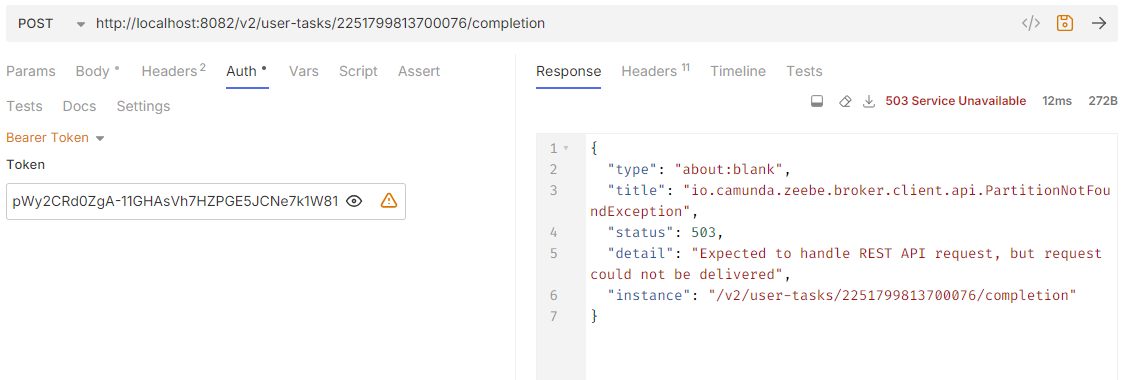
I get stuck here. Is there a solution for that?
@Charles_Andrea - in your last screenshot, you are using a different endpoint than the first one (/v2 instead of /v1), so that error represents a different configuration issue. You are using a new endpoint, and I believe you need to enable that endpoint, but it also depends on what version you are running.